> ## Documentation Index
> Fetch the complete documentation index at: https://www.klavis.ai/docs/llms.txt
> Use this file to discover all available pages before exploring further.
# CrewAI
> Build powerful AI agent crews that integrate with Strata MCP servers to build AI agents that can interact with Gmail and Slack.
## Partnership
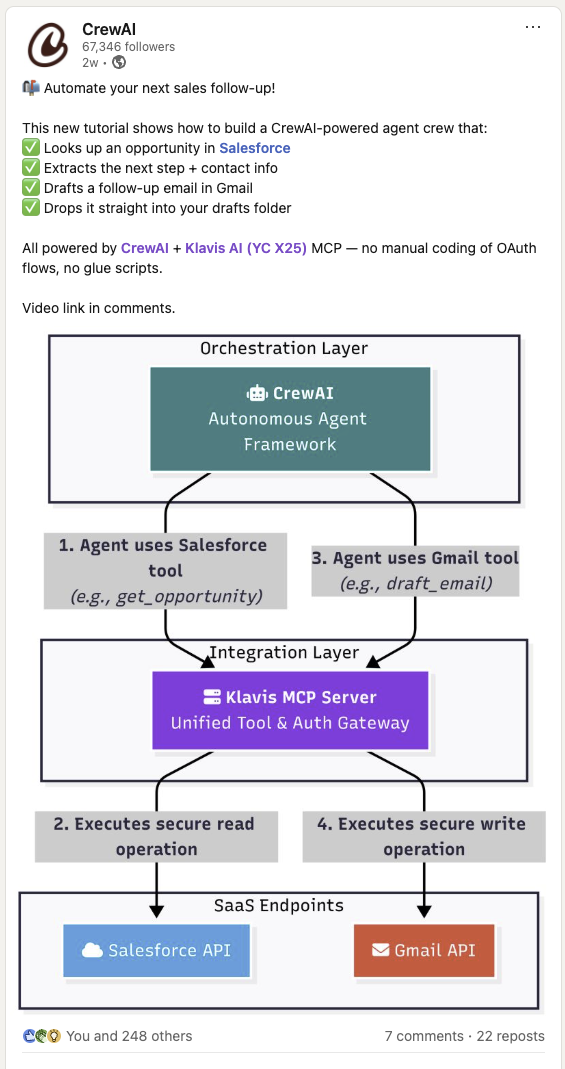
CrewAI has officially showcased their integration with Klavis AI in [this LinkedIn post](https://www.linkedin.com/feed/update/urn:li:activity:7346573584267395072/), demonstrating how to build powerful AI agent crews that can automate complex workflows across multiple platforms.
 ## Prerequisites
Before we begin, you'll need:
Get your API key from OpenAI Platform (CrewAI uses OpenAI as the default model)
Get your API key from Klavis AI
## Installation
First, install the required packages:
```bash Python theme={null}
pip install crewai 'crewai-tools[mcp]' klavis openai
```
```bash TypeScript theme={null}
npm install crewai crewai-tools klavis openai
```
## Setup Environment Variables
```python Python theme={null}
import os
# Set environment variables
os.environ["OPENAI_API_KEY"] = "your-openai-api-key-here" # Replace with your actual OpenAI API key
os.environ["KLAVIS_API_KEY"] = "your-klavis-api-key-here" # Replace with your actual Klavis API key
```
```typescript TypeScript theme={null}
// Set environment variables in your .env file
process.env.OPENAI_API_KEY = "your-openai-api-key-here"; // Replace with your actual OpenAI API key
process.env.KLAVIS_API_KEY = "your-klavis-api-key-here"; // Replace with your actual Klavis API key
```
## CrewAI with MCP Integration
CrewAI allows you to create specialized AI agent crews where each agent can have access to different MCP tools. This enables sophisticated multi-agent workflows that can:
1. **Create MCP Instances**: Set up connections to external services
2. **Specialized Agents**: Each agent focuses on specific tasks with relevant tools
3. **Collaborative Workflows**: Agents work together in sequential or parallel processes
4. **Tool Discovery**: Automatically discover available tools from MCP servers
5. **Smart Coordination**: CrewAI manages task dependencies and agent collaboration
## Crew AI + Klavis Strata
Create a crew agent that helps in assisting user queries using Strata Server
### Step 1 - Create Strata MCP Server with Gmail and Slack
```python Python theme={null}
from klavis import Klavis
from klavis.types import McpServerName, ToolFormat
import webbrowser
klavis_client = Klavis(api_key=os.getenv("KLAVIS_API_KEY"))
response = klavis_client.mcp_server.create_strata_server(
servers=[McpServerName.GMAIL, McpServerName.SLACK],
user_id="1234"
)
# Handle OAuth authorization for each services
if response.oauth_urls:
for server_name, oauth_url in response.oauth_urls.items():
webbrowser.open(oauth_url)
print(f"Or please open this URL to complete {server_name} OAuth authorization: {oauth_url}")
```
```typescript TypeScript theme={null}
const klavisClient = new KlavisClient({ apiKey: process.env.KLAVIS_API_KEY });
const response = await klavisClient.mcpServer.createStrataServer({
servers: [Klavis.McpServerName.Gmail, Klavis.McpServerName.Slack],
userId: "1234"
});
// Handle OAuth authorization for each services
if (response.oauthUrls) {
for (const [serverName, oauthUrl] of Object.entries(response.oauthUrls)) {
window.open(oauthUrl);
// Wait for user to complete OAuth
await new Promise(resolve => {
const input = prompt(`Press OK after completing ${serverName} OAuth authorization...`);
resolve(input);
});
}
}
```
**OAuth Authorization Required**: The code above will open browser windows for each service. Click through the OAuth flow to authorize access to your accounts.
### Step 2 - Create method to use MCP Server with Crew AI
This method handles multiple rounds of tool calls until a final response is ready, allowing the AI to chain tool executions for complex tasks.
```python Python theme={null}
import json
from crewai import Agent, Task, Crew, Process
from crewai_tools import MCPServerAdapter
def crew_with_mcp_server(mcp_server_url: str, user_query: str):
klavis_server_params = [
{
"url": mcp_server_url,
"transport": "streamable-http"
}
]
with MCPServerAdapter(klavis_server_params) as all_mcp_tools:
print(f"Available tools: {[tool.name for tool in all_mcp_tools]}")
klavis_agent = Agent(
role="Klavis Query Assistant",
goal="Assist the user with their query using available tools",
backstory="Expert at assisting users with their queries using available tools",
tools=all_mcp_tools,
verbose=False,
llm="gpt-4o"
)
klavis_task = Task(
description=f"Answer the user's query: {user_query}",
expected_output="Provide a detailed response to the user's query",
agent=klavis_agent
)
crew = Crew(
agents = [klavis_agent],
tasks = [klavis_task],
process=Process.sequential,
verbose=True
)
result = crew.kickoff()
return result
```
```typescript TypeScript theme={null}
import { Agent, Task, Crew, Process } from 'crewai';
import { MCPServerAdapter } from 'crewai-tools';
async function crewWithMcpServer(mcpServerUrl: string, userQuery: string) {
const klavisServerParams = [
{
url: mcpServerUrl,
transport: "streamable-http"
}
];
const mcpAdapter = new MCPServerAdapter(klavisServerParams);
const allMcpTools = await mcpAdapter.getTools();
console.log(`Available tools: ${allMcpTools.map(tool => tool.name)}`);
const klavisAgent = new Agent({
role: "Klavis Query Assistant",
goal: "Assist the user with their query using available tools",
backstory: "Expert at assisting users with their queries using available tools",
tools: allMcpTools,
verbose: false,
llm: "gpt-4o"
});
const klavisTask = new Task({
description: `Answer the user's query: ${userQuery}`,
expectedOutput: "Provide a detailed response to the user's query",
agent: klavisAgent
});
const crew = new Crew({
agents: [klavisAgent],
tasks: [klavisTask],
process: Process.Sequential,
verbose: true
});
const result = await crew.kickoff();
return result;
}
```
### Step 3 - Run!
```python Python theme={null}
result = crew_with_mcp_server(
mcp_server_url=response.strata_server_url,
user_query="Check my latest 5 emails and summarize them in a Slack message to #general"
)
print(f"\nFinal Response: {result}")
```
```typescript TypeScript theme={null}
result = await crewWithMcpServer(
response.strataServerUrl,
"Check my latest emails and summarize them in a Slack message to #updates"
);
console.log(`\nFinal Response: ${result}`);
```
Perfect! You've integrated Crew with Strata MCP servers.
## Security Best Practices
When using CrewAI with Klavis MCP servers, follow these security guidelines:
```python Python theme={null}
def create_secure_crew():
"""Demonstrates secure MCP server integration with CrewAI"""
# 1. Use environment variables for sensitive data
api_key = os.getenv("KLAVIS_API_KEY")
if not api_key:
raise ValueError("KLAVIS_API_KEY environment variable is required")
# 2. Validate server URLs (use HTTPS in production)
server_params = [{
"url": server_instance.server_url,
"transport": "streamable-http"
}]
# 3. Always use context managers for proper resource cleanup
try:
with MCPServerAdapter(server_params) as mcp_tools:
# 4. Validate available tools before use
if not mcp_tools:
raise ValueError("No tools available from MCP server")
print(f"✅ Securely connected with {len(mcp_tools)} tools")
# 5. Create agents with limited scope
agent = Agent(
role="Data Analyst",
goal="Analyze data within defined parameters",
backstory="You operate within strict security guidelines.",
tools=mcp_tools,
reasoning=False, # Disable for production
verbose=False # Disable verbose logging in production
)
return agent
except Exception as e:
print(f"🔒 Security check failed: {e}")
return None
# Example usage
secure_agent = create_secure_crew()
if secure_agent:
print("✅ Secure crew created successfully")
```
```typescript TypeScript theme={null}
function createSecureCrew() {
// 1. Use environment variables for sensitive data
const apiKey = process.env.KLAVIS_API_KEY;
if (!apiKey) {
throw new Error("KLAVIS_API_KEY environment variable is required");
}
// 2. Validate server URLs (use HTTPS in production)
const serverParams = [{
url: serverInstance.serverUrl,
transport: "streamable-http"
}];
// 3. Always handle errors properly
try {
// 4. Validate available tools before use
const mcpTools = new MCPServerAdapter(serverParams);
if (!mcpTools) {
throw new Error("No tools available from MCP server");
}
console.log(`✅ Securely connected with tools`);
// 5. Create agents with limited scope
const agent = new Agent({
role: "Data Analyst",
goal: "Analyze data within defined parameters",
backstory: "You operate within strict security guidelines.",
tools: mcpTools,
reasoning: false, // Disable for production
verbose: false // Disable verbose logging in production
});
return agent;
} catch (error) {
console.error(`🔒 Security check failed: ${error}`);
return null;
}
}
// Example usage
const secureAgent = createSecureCrew();
if (secureAgent) {
console.log("✅ Secure crew created successfully");
}
```
## Available MCP Servers
CrewAI works with all Klavis MCP servers. Here are some popular options:
Gmail, Slack, Discord, Outlook
YouTube, Notion, Google Docs, WordPress
GitHub, Jira, Linear, Confluence
Google Sheets, Supabase, PostgreSQL
Salesforce, HubSpot, Asana, ClickUp
Google Drive, Dropbox, OneDrive
## Summary
CrewAI + Klavis integration enables you to build sophisticated multi-agent AI systems with real-world capabilities. Key benefits include:
### 🚀 **CrewAI + Klavis Benefits:**
* **Seamless Integration**: MCPServerAdapter makes MCP connection effortless
* **Agent Specialization**: Each agent can focus on specific domains
* **Scalable Architecture**: Easy to add more agents and MCP servers
* **Professional AI Teams**: Create sophisticated multi-agent systems
* **Real-World Impact**: Connect AI to actual business tools and services
**Ready to build your first AI crew?** Start with a simple agent and expand from there! 🚀👥
## Prerequisites
Before we begin, you'll need:
Get your API key from OpenAI Platform (CrewAI uses OpenAI as the default model)
Get your API key from Klavis AI
## Installation
First, install the required packages:
```bash Python theme={null}
pip install crewai 'crewai-tools[mcp]' klavis openai
```
```bash TypeScript theme={null}
npm install crewai crewai-tools klavis openai
```
## Setup Environment Variables
```python Python theme={null}
import os
# Set environment variables
os.environ["OPENAI_API_KEY"] = "your-openai-api-key-here" # Replace with your actual OpenAI API key
os.environ["KLAVIS_API_KEY"] = "your-klavis-api-key-here" # Replace with your actual Klavis API key
```
```typescript TypeScript theme={null}
// Set environment variables in your .env file
process.env.OPENAI_API_KEY = "your-openai-api-key-here"; // Replace with your actual OpenAI API key
process.env.KLAVIS_API_KEY = "your-klavis-api-key-here"; // Replace with your actual Klavis API key
```
## CrewAI with MCP Integration
CrewAI allows you to create specialized AI agent crews where each agent can have access to different MCP tools. This enables sophisticated multi-agent workflows that can:
1. **Create MCP Instances**: Set up connections to external services
2. **Specialized Agents**: Each agent focuses on specific tasks with relevant tools
3. **Collaborative Workflows**: Agents work together in sequential or parallel processes
4. **Tool Discovery**: Automatically discover available tools from MCP servers
5. **Smart Coordination**: CrewAI manages task dependencies and agent collaboration
## Crew AI + Klavis Strata
Create a crew agent that helps in assisting user queries using Strata Server
### Step 1 - Create Strata MCP Server with Gmail and Slack
```python Python theme={null}
from klavis import Klavis
from klavis.types import McpServerName, ToolFormat
import webbrowser
klavis_client = Klavis(api_key=os.getenv("KLAVIS_API_KEY"))
response = klavis_client.mcp_server.create_strata_server(
servers=[McpServerName.GMAIL, McpServerName.SLACK],
user_id="1234"
)
# Handle OAuth authorization for each services
if response.oauth_urls:
for server_name, oauth_url in response.oauth_urls.items():
webbrowser.open(oauth_url)
print(f"Or please open this URL to complete {server_name} OAuth authorization: {oauth_url}")
```
```typescript TypeScript theme={null}
const klavisClient = new KlavisClient({ apiKey: process.env.KLAVIS_API_KEY });
const response = await klavisClient.mcpServer.createStrataServer({
servers: [Klavis.McpServerName.Gmail, Klavis.McpServerName.Slack],
userId: "1234"
});
// Handle OAuth authorization for each services
if (response.oauthUrls) {
for (const [serverName, oauthUrl] of Object.entries(response.oauthUrls)) {
window.open(oauthUrl);
// Wait for user to complete OAuth
await new Promise(resolve => {
const input = prompt(`Press OK after completing ${serverName} OAuth authorization...`);
resolve(input);
});
}
}
```
**OAuth Authorization Required**: The code above will open browser windows for each service. Click through the OAuth flow to authorize access to your accounts.
### Step 2 - Create method to use MCP Server with Crew AI
This method handles multiple rounds of tool calls until a final response is ready, allowing the AI to chain tool executions for complex tasks.
```python Python theme={null}
import json
from crewai import Agent, Task, Crew, Process
from crewai_tools import MCPServerAdapter
def crew_with_mcp_server(mcp_server_url: str, user_query: str):
klavis_server_params = [
{
"url": mcp_server_url,
"transport": "streamable-http"
}
]
with MCPServerAdapter(klavis_server_params) as all_mcp_tools:
print(f"Available tools: {[tool.name for tool in all_mcp_tools]}")
klavis_agent = Agent(
role="Klavis Query Assistant",
goal="Assist the user with their query using available tools",
backstory="Expert at assisting users with their queries using available tools",
tools=all_mcp_tools,
verbose=False,
llm="gpt-4o"
)
klavis_task = Task(
description=f"Answer the user's query: {user_query}",
expected_output="Provide a detailed response to the user's query",
agent=klavis_agent
)
crew = Crew(
agents = [klavis_agent],
tasks = [klavis_task],
process=Process.sequential,
verbose=True
)
result = crew.kickoff()
return result
```
```typescript TypeScript theme={null}
import { Agent, Task, Crew, Process } from 'crewai';
import { MCPServerAdapter } from 'crewai-tools';
async function crewWithMcpServer(mcpServerUrl: string, userQuery: string) {
const klavisServerParams = [
{
url: mcpServerUrl,
transport: "streamable-http"
}
];
const mcpAdapter = new MCPServerAdapter(klavisServerParams);
const allMcpTools = await mcpAdapter.getTools();
console.log(`Available tools: ${allMcpTools.map(tool => tool.name)}`);
const klavisAgent = new Agent({
role: "Klavis Query Assistant",
goal: "Assist the user with their query using available tools",
backstory: "Expert at assisting users with their queries using available tools",
tools: allMcpTools,
verbose: false,
llm: "gpt-4o"
});
const klavisTask = new Task({
description: `Answer the user's query: ${userQuery}`,
expectedOutput: "Provide a detailed response to the user's query",
agent: klavisAgent
});
const crew = new Crew({
agents: [klavisAgent],
tasks: [klavisTask],
process: Process.Sequential,
verbose: true
});
const result = await crew.kickoff();
return result;
}
```
### Step 3 - Run!
```python Python theme={null}
result = crew_with_mcp_server(
mcp_server_url=response.strata_server_url,
user_query="Check my latest 5 emails and summarize them in a Slack message to #general"
)
print(f"\nFinal Response: {result}")
```
```typescript TypeScript theme={null}
result = await crewWithMcpServer(
response.strataServerUrl,
"Check my latest emails and summarize them in a Slack message to #updates"
);
console.log(`\nFinal Response: ${result}`);
```
Perfect! You've integrated Crew with Strata MCP servers.
## Security Best Practices
When using CrewAI with Klavis MCP servers, follow these security guidelines:
```python Python theme={null}
def create_secure_crew():
"""Demonstrates secure MCP server integration with CrewAI"""
# 1. Use environment variables for sensitive data
api_key = os.getenv("KLAVIS_API_KEY")
if not api_key:
raise ValueError("KLAVIS_API_KEY environment variable is required")
# 2. Validate server URLs (use HTTPS in production)
server_params = [{
"url": server_instance.server_url,
"transport": "streamable-http"
}]
# 3. Always use context managers for proper resource cleanup
try:
with MCPServerAdapter(server_params) as mcp_tools:
# 4. Validate available tools before use
if not mcp_tools:
raise ValueError("No tools available from MCP server")
print(f"✅ Securely connected with {len(mcp_tools)} tools")
# 5. Create agents with limited scope
agent = Agent(
role="Data Analyst",
goal="Analyze data within defined parameters",
backstory="You operate within strict security guidelines.",
tools=mcp_tools,
reasoning=False, # Disable for production
verbose=False # Disable verbose logging in production
)
return agent
except Exception as e:
print(f"🔒 Security check failed: {e}")
return None
# Example usage
secure_agent = create_secure_crew()
if secure_agent:
print("✅ Secure crew created successfully")
```
```typescript TypeScript theme={null}
function createSecureCrew() {
// 1. Use environment variables for sensitive data
const apiKey = process.env.KLAVIS_API_KEY;
if (!apiKey) {
throw new Error("KLAVIS_API_KEY environment variable is required");
}
// 2. Validate server URLs (use HTTPS in production)
const serverParams = [{
url: serverInstance.serverUrl,
transport: "streamable-http"
}];
// 3. Always handle errors properly
try {
// 4. Validate available tools before use
const mcpTools = new MCPServerAdapter(serverParams);
if (!mcpTools) {
throw new Error("No tools available from MCP server");
}
console.log(`✅ Securely connected with tools`);
// 5. Create agents with limited scope
const agent = new Agent({
role: "Data Analyst",
goal: "Analyze data within defined parameters",
backstory: "You operate within strict security guidelines.",
tools: mcpTools,
reasoning: false, // Disable for production
verbose: false // Disable verbose logging in production
});
return agent;
} catch (error) {
console.error(`🔒 Security check failed: ${error}`);
return null;
}
}
// Example usage
const secureAgent = createSecureCrew();
if (secureAgent) {
console.log("✅ Secure crew created successfully");
}
```
## Available MCP Servers
CrewAI works with all Klavis MCP servers. Here are some popular options:
Gmail, Slack, Discord, Outlook
YouTube, Notion, Google Docs, WordPress
GitHub, Jira, Linear, Confluence
Google Sheets, Supabase, PostgreSQL
Salesforce, HubSpot, Asana, ClickUp
Google Drive, Dropbox, OneDrive
## Summary
CrewAI + Klavis integration enables you to build sophisticated multi-agent AI systems with real-world capabilities. Key benefits include:
### 🚀 **CrewAI + Klavis Benefits:**
* **Seamless Integration**: MCPServerAdapter makes MCP connection effortless
* **Agent Specialization**: Each agent can focus on specific domains
* **Scalable Architecture**: Easy to add more agents and MCP servers
* **Professional AI Teams**: Create sophisticated multi-agent systems
* **Real-World Impact**: Connect AI to actual business tools and services
**Ready to build your first AI crew?** Start with a simple agent and expand from there! 🚀👥