> ## Documentation Index
> Fetch the complete documentation index at: https://www.klavis.ai/docs/llms.txt
> Use this file to discover all available pages before exploring further.
# Mastra
> Learn how to build AI agents that integrate Mastra framework with Klavis MCP Servers for enhanced functionality
## Partnership
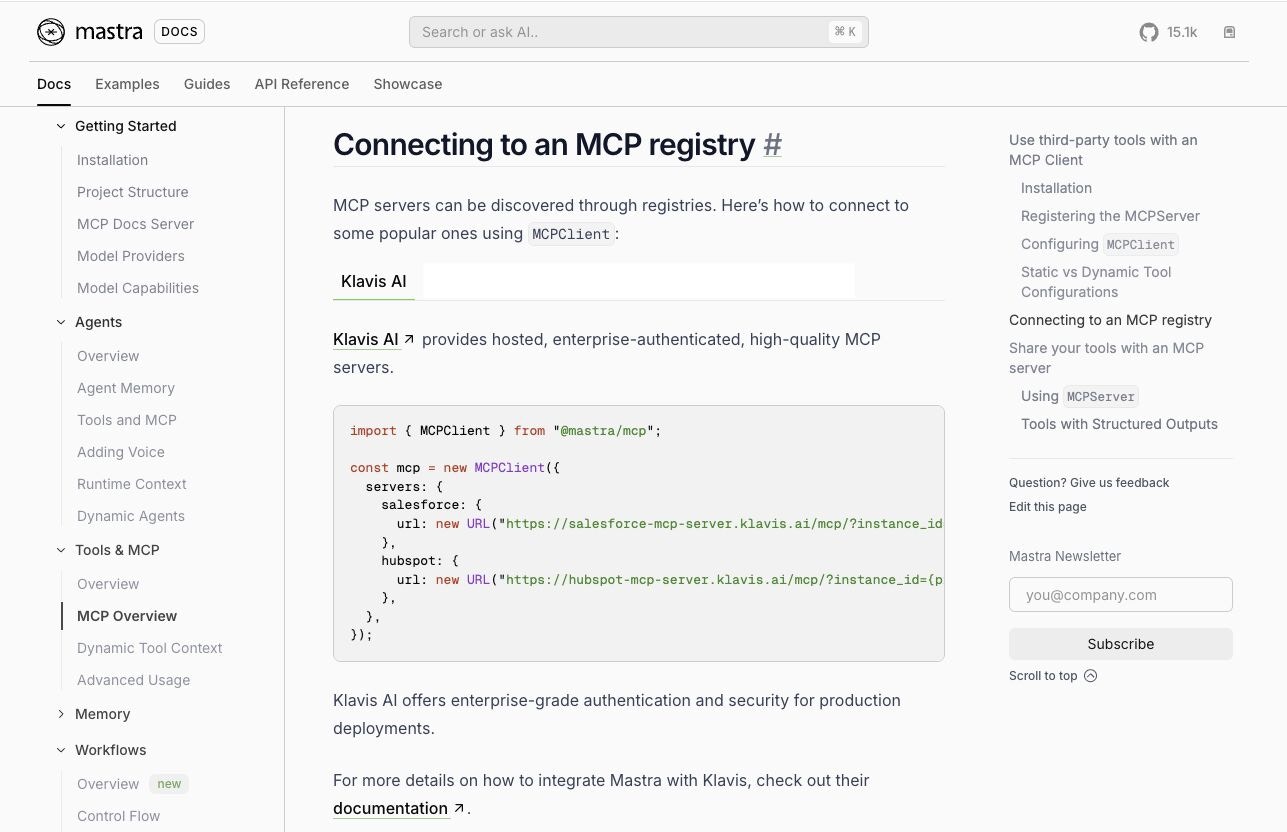
Mastra has officially featured Klavis AI in [their MCP registry documentation](https://mastra.ai/en/docs/tools-mcp/mcp-overview#connecting-to-an-mcp-registry), showcasing how to connect to MCP servers for building powerful AI agents.
## Prerequisites
Before we begin, you'll need [OpenAI API key](https://platform.openai.com/api-keys) and [Klavis API key](https://www.klavis.ai/home/api-keys).
You can find the complete example code in Klavis GitHub repository: **[📁 Checkout here](https://github.com/Klavis-AI/klavis/tree/main/examples/mastra-klavis)**
## Setup Environment Variables
Create a `.env` file in your project root:
```env theme={null}
OPENAI_API_KEY=your_openai_api_key_here
KLAVIS_API_KEY=your_klavis_api_key_here
```
## Project Structure
```
mastra-klavis-example/
├── src/
│ └── mastra/
│ └── index.ts
├── package.json
└── tsconfig.json
```
## Code Example
```typescript theme={null}
import { Mastra } from '@mastra/core/mastra';
import { Agent } from '@mastra/core/agent';
import { openai } from '@ai-sdk/openai';
import { MCPClient } from '@mastra/mcp';
import { KlavisClient, Klavis } from 'klavis';
import open from 'open';
// Creates an MCP Agent with tools from Klavis Strata server
export const createMcpAgent = async (userId: string = 'test-user'): Promise => {
const klavis = new KlavisClient({ apiKey: process.env.KLAVIS_API_KEY! });
// Create a Strata MCP Server with Gmail and Slack
const response = await klavis.mcpServer.createStrataServer({
servers: [Klavis.McpServerName.Gmail, Klavis.McpServerName.Slack],
userId
});
// Handle OAuth authorization for each service
if (response.oauthUrls) {
for (const [serverName, oauthUrl] of Object.entries(response.oauthUrls)) {
await open(oauthUrl);
console.log(`Please complete ${serverName} OAuth authorization at: ${oauthUrl}`);
}
}
// Initialize the MCP client with Strata server URL
const mcpClient = new MCPClient({
servers: {
strata: {
url: new URL(response.strataServerUrl)
}
}
});
// Create agent
return new Agent({
name: 'MCP Agent',
instructions: `You are an AI agent with access to MCP tools.`,
model: openai('gpt-4o-mini'),
tools: await mcpClient.getTools()
});
};
const agent = await createMcpAgent();
export const mastra = new Mastra({
agents: { agent }
});
```
## Running the Agent
```bash theme={null}
npm install
npm run dev
```
## Video Tutorial
## Summary
This implementation demonstrates how to integrate Mastra with Klavis Strata servers to access multiple MCP services (Gmail and Slack) through a single unified server. The agent is configured with MCP tools and can interact with various services through the MCP protocol.
## Useful Resources
* [Mastra Doc](https://mastra.ai/docs)
* [Mastra GitHub Repo](https://github.com/mastra-ai/mastra)
* [MCP Spec](https://modelcontextprotocol.io/)
**Happy building with Mastra and Klavis!** 🚀
 ## Prerequisites
Before we begin, you'll need [OpenAI API key](https://platform.openai.com/api-keys) and [Klavis API key](https://www.klavis.ai/home/api-keys).
## Prerequisites
Before we begin, you'll need [OpenAI API key](https://platform.openai.com/api-keys) and [Klavis API key](https://www.klavis.ai/home/api-keys).