> ## Documentation Index
> Fetch the complete documentation index at: https://www.klavis.ai/docs/llms.txt
> Use this file to discover all available pages before exploring further.
# White-label
> White-label allows you to integrate our OAuth flows with your own branding and custom OAuth applications
For detailed OAuth scope and how to create your own OAuth app, see our [OAuth knowledge](/docs/knowledge-base/oauth_app/oauth-scopes).
## What is White-label?
White-label allows you to customize the authentication experience with your own branding. When enabled, users will see your application name, logo, and other brand elements during the OAuth flow instead of Klavis AI's.
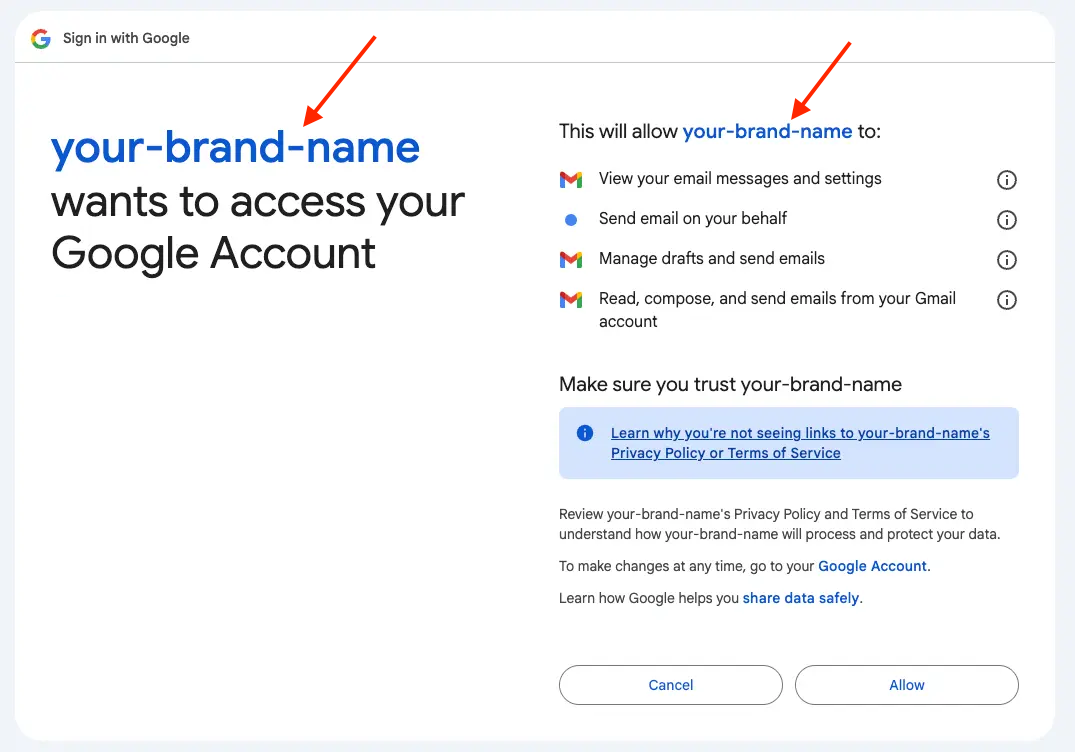 ## OAuth Flow (w/ white-label)
```mermaid theme={null}
sequenceDiagram
actor EndUser
participant ClientApp as Your App
participant KlavisAI as Klavis AI
participant ThirdPartyIdP as Third-party App
%% --- OAuth Flow Initiation ---
EndUser->>ClientApp: 1. Initiates action in Your App
## OAuth Flow (w/ white-label)
```mermaid theme={null}
sequenceDiagram
actor EndUser
participant ClientApp as Your App
participant KlavisAI as Klavis AI
participant ThirdPartyIdP as Third-party App
%% --- OAuth Flow Initiation ---
EndUser->>ClientApp: 1. Initiates action in Your App
(e.g., "Connect my Account").
ClientApp->>KlavisAI: 2. Requests Klavis AI
to start OAuth flow.
activate KlavisAI
Note over KlavisAI: Klavis AI retrieves the Your App's Config
KlavisAI->>EndUser: 3. Redirects End-User's browser to
Third-party authorization endpoint.
deactivate KlavisAI
activate EndUser
EndUser->>ThirdPartyIdP: 4. Browser navigates to Third-party authorization URL.
activate ThirdPartyIdP
ThirdPartyIdP-->>EndUser: 5. Third-party App presents its Login & Consent screen with Your App Info and Logo.
EndUser->>ThirdPartyIdP: 6. End-User authenticates with Third-party App & grants consent.
deactivate EndUser
ThirdPartyIdP-->>KlavisAI: 7. Third-party App redirects
Klavis AI callback URI.
deactivate ThirdPartyIdP
%% --- Token Exchange (Klavis AI with Third-party) ---
KlavisAI->>ThirdPartyIdP: 8. Klavis AI exchanges
Authorization Code for Access Token.
activate ThirdPartyIdP
ThirdPartyIdP-->>KlavisAI: 9. Third-party returns
Access/Refresh Token to Klavis AI.
deactivate ThirdPartyIdP
KlavisAI->>EndUser: 10. OAuth White Labeling succeeds.
```
## Implementation
### Setting Up White-label
To set up white-label for your OAuth integrations:
Register your application with the third-party service (GitHub, Slack, etc.) to obtain your client ID and client secret.
Go to the Klavis AI white label configuration page:
[https://www.klavis.ai/home/white-label](https://www.klavis.ai/home/white-label)
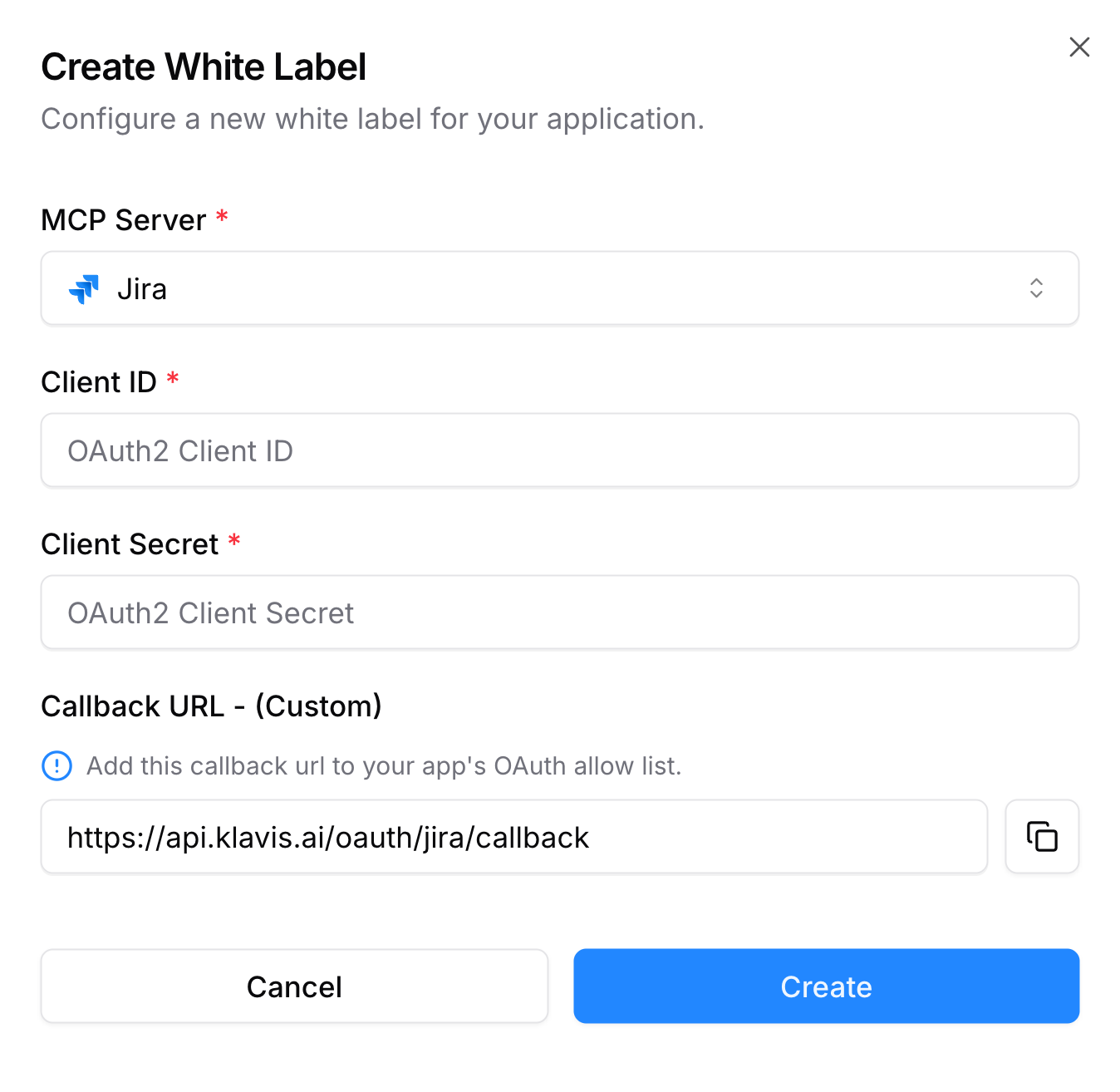 Make sure to add the callback url to your app's OAuth allow list.
Redirect users to the Klavis AI OAuth authorization endpoint with your client ID:
```javascript without SDK theme={null}
// Example: Initiating GitHub OAuth with white-label
const authUrl = `https://api.klavis.ai/oauth/github/authorize?instance_id=${instanceId}&client_id=${yourClientId}`;
window.location.href = authUrl;
```
```typescript TypeScript SDK theme={null}
import { Klavis } from "@klavis/sdk";
const klavis = new Klavis({
apiKey: "YOUR_API_KEY"
});
// Example: Initiating GitHub OAuth with white-label
const oauthUrl = await klavis.mcpServer.getOAuthUrl({
serverName: Klavis.McpServerName.Github,
instanceId: instanceId,
clientId: yourClientId,
// redirectUri: YOUR_REDIRECT_URI,
// scope: "YOUR_SCOPES",
});
window.location.href = oauthUrl;
```
```python Python SDK theme={null}
import webbrowser
from klavis import Klavis
from klavis.types import McpServerName
klavis = Klavis(api_key="YOUR_API_KEY")
# Example: Initiating GitHub OAuth with white-label
oauth_url = klavis.mcp_server.get_oauth_url(
server_name=McpServerName.GITHUB,
instance_id=instance_id,
client_id=your_client_id,
# redirect_uri="YOUR_REDIRECT_URI",
# scope="YOUR_SCOPES"
)
# Open OAuth URL in user's default browser
webbrowser.open(oauth_url)
```
You can also specify scope and redirect\_url in the authUrl, check the api reference for more details.
For simplicity, you can use the default callback URL: [https://api.klavis.ai/oauth/\{server\_name}/callback](https://api.klavis.ai/oauth/\{server_name}/callback),
as shown in the previous step. This is the endpoint where we handle user credentials for authentication.
However, some OAuth consent screens (such as GitHub's) display the callback URL to the user. If this URL doesn't match your application's domain, it can appear untrustworthy.
To address this, you can use a callback URL under your own domain and set up a redirect—either via DNS or within your application—that forwards requests to:
[https://api.klavis.ai/oauth/\{server\_name}/callback](https://api.klavis.ai/oauth/\{server_name}/callback). Below is an example using FastAPI to simply redirect from your Github oauth application to Klavis oauth service in python -
```python theme={null}
@app.get("/github/redirect")
async def redirect_to_jira_callback(request: Request):
target_url = "https://api.klavis.ai/oauth/github/callback"
query_params = request.query_params
if query_params:
query_string = str(query_params)
target_url = f"{target_url}?{query_string}"
return RedirectResponse(url=target_url)
```
For technical assistance with OAuth implementation or white-label, please join our Discord community.
Make sure to add the callback url to your app's OAuth allow list.
Redirect users to the Klavis AI OAuth authorization endpoint with your client ID:
```javascript without SDK theme={null}
// Example: Initiating GitHub OAuth with white-label
const authUrl = `https://api.klavis.ai/oauth/github/authorize?instance_id=${instanceId}&client_id=${yourClientId}`;
window.location.href = authUrl;
```
```typescript TypeScript SDK theme={null}
import { Klavis } from "@klavis/sdk";
const klavis = new Klavis({
apiKey: "YOUR_API_KEY"
});
// Example: Initiating GitHub OAuth with white-label
const oauthUrl = await klavis.mcpServer.getOAuthUrl({
serverName: Klavis.McpServerName.Github,
instanceId: instanceId,
clientId: yourClientId,
// redirectUri: YOUR_REDIRECT_URI,
// scope: "YOUR_SCOPES",
});
window.location.href = oauthUrl;
```
```python Python SDK theme={null}
import webbrowser
from klavis import Klavis
from klavis.types import McpServerName
klavis = Klavis(api_key="YOUR_API_KEY")
# Example: Initiating GitHub OAuth with white-label
oauth_url = klavis.mcp_server.get_oauth_url(
server_name=McpServerName.GITHUB,
instance_id=instance_id,
client_id=your_client_id,
# redirect_uri="YOUR_REDIRECT_URI",
# scope="YOUR_SCOPES"
)
# Open OAuth URL in user's default browser
webbrowser.open(oauth_url)
```
You can also specify scope and redirect\_url in the authUrl, check the api reference for more details.
For simplicity, you can use the default callback URL: [https://api.klavis.ai/oauth/\{server\_name}/callback](https://api.klavis.ai/oauth/\{server_name}/callback),
as shown in the previous step. This is the endpoint where we handle user credentials for authentication.
However, some OAuth consent screens (such as GitHub's) display the callback URL to the user. If this URL doesn't match your application's domain, it can appear untrustworthy.
To address this, you can use a callback URL under your own domain and set up a redirect—either via DNS or within your application—that forwards requests to:
[https://api.klavis.ai/oauth/\{server\_name}/callback](https://api.klavis.ai/oauth/\{server_name}/callback). Below is an example using FastAPI to simply redirect from your Github oauth application to Klavis oauth service in python -
```python theme={null}
@app.get("/github/redirect")
async def redirect_to_jira_callback(request: Request):
target_url = "https://api.klavis.ai/oauth/github/callback"
query_params = request.query_params
if query_params:
query_string = str(query_params)
target_url = f"{target_url}?{query_string}"
return RedirectResponse(url=target_url)
```
For technical assistance with OAuth implementation or white-label, please join our Discord community.