> ## Documentation Index
> Fetch the complete documentation index at: https://www.klavis.ai/docs/llms.txt
> Use this file to discover all available pages before exploring further.
# Setting Up Moneybird OAuth App
> Complete guide to creating and configuring a Moneybird OAuth application
## Prerequisites
* Moneybird Account
## Step 1: Registration of your application
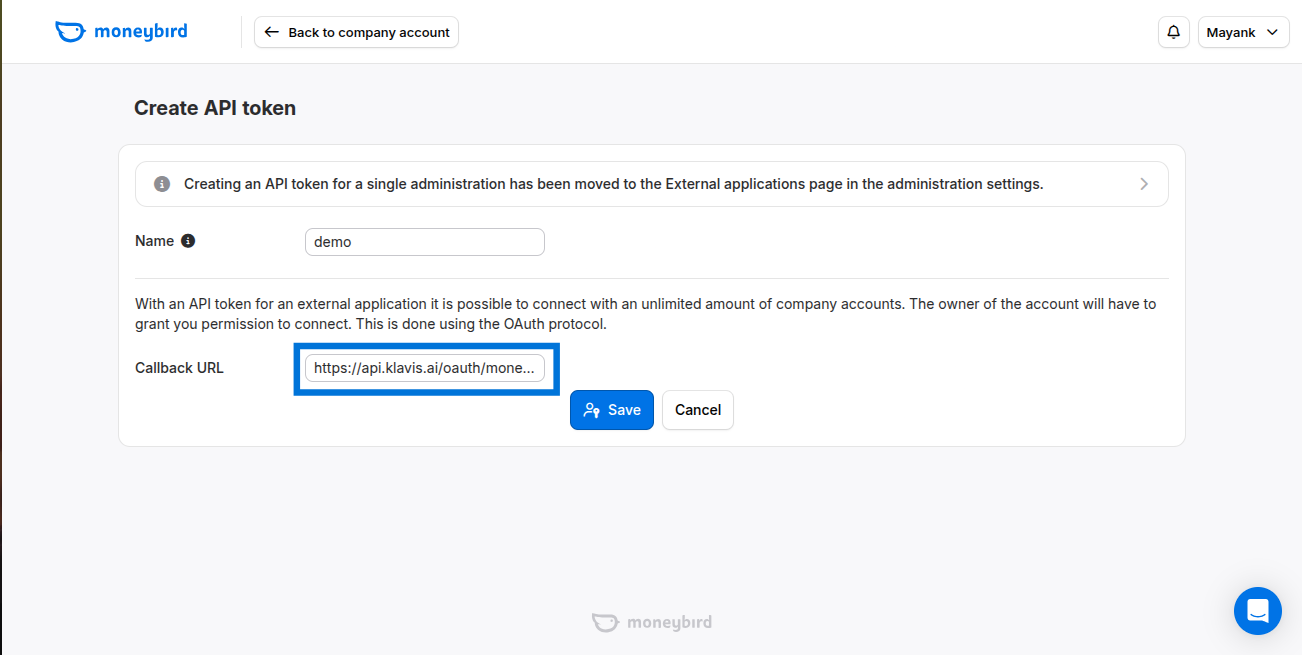
1. Visit [https://moneybird.com/user/applications/new](https://moneybird.com/user/applications/new)
2. Enter a Good Name
3. Add callback URL: `https://api.klavis.ai/oauth/moneybird/callback`
4. Click Save.
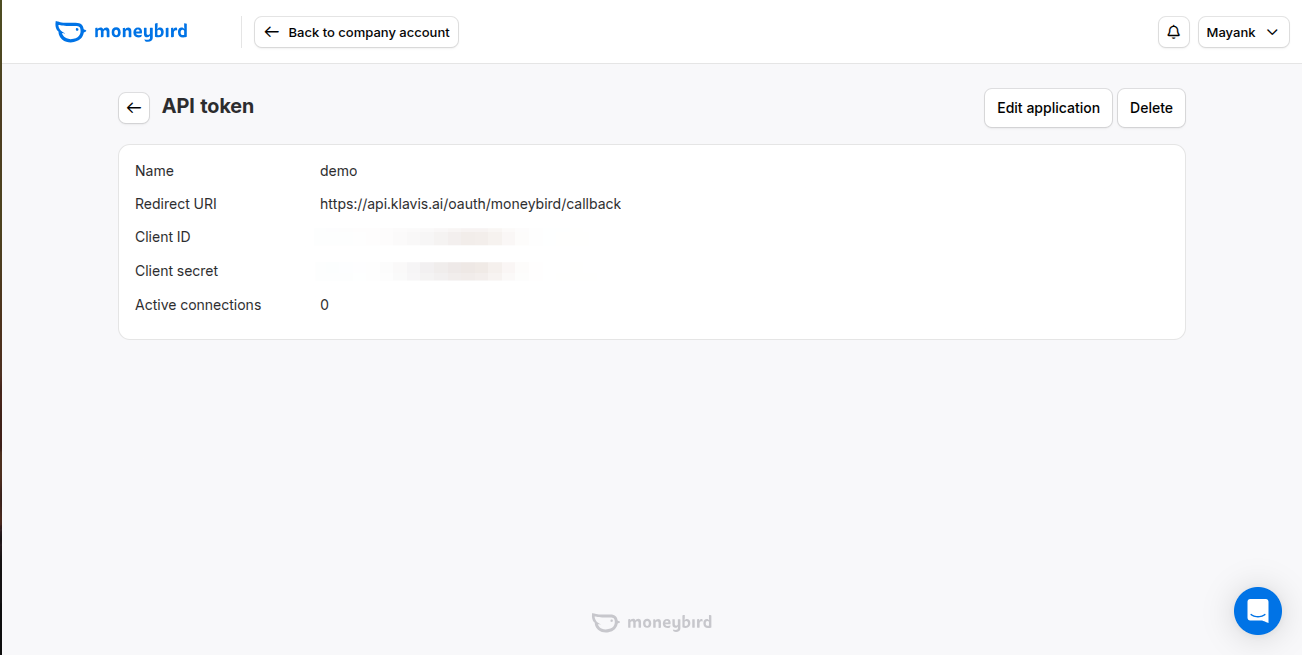
 From This, You will Get Your Client ID and Client secret.
 ## Step 2: Request Scopes
Klavis Moneybird MCP Server uses the following OAuth scopes: `sales_invoices, documents, estimates, bank, time_entries, settings`
When redirecting a user to the Moneybird authorization page, include the scope parameter in your URL. Multiple scopes should be space-separated.
Example authorization URL:
```
curl -vv \
'https://moneybird.com/oauth/authorize?client_id=9a833de2d13b07dfdfb50a8124b148d8&redirect_uri=urn:ietf:wg:oauth:2.0:oob&response_type=code&scope=extimates%20bank'
```
You have successfully created a Moneybird OAuth application! You now have your Client ID and Client Secret ready for integration with Klavis AI.
## (Optional) Step 3: White Labeling
White labeling allows you to customize the OAuth experience with your own branding instead of Klavis AI's.
If you want to use your own Moneybird OAuth application with custom branding:
1. **Configure White Labeling**: Go to [https://www.klavis.ai/home/white-label](https://www.klavis.ai/home/white-label)
2. **Add Your Credentials**: Enter your Moneybird **Client ID** and **Client Secret** from Step 1
3. **Set Redirect URI**: Use `https://api.klavis.ai/oauth/moneybird/callback` or your custom callback URL
4. **Initiate OAuth**: Use your client ID when starting the OAuth flow:
```javascript without SDK theme={null}
// Example: Initiating Moneybird OAuth with white-label
const authUrl = `https://api.klavis.ai/oauth/moneybird/authorize?instance_id=${instanceId}&client_id=${yourClientId}`;
window.location.href = authUrl;
```
```typescript TypeScript SDK theme={null}
import { Klavis } from "@klavis/sdk";
const klavis = new Klavis({
apiKey: "YOUR_API_KEY"
});
// Example: Initiating Moneybird OAuth with white-label
const oauthUrl = await klavis.mcpServer.getOAuthUrl({
serverName: Klavis.McpServerName.Moneybird,
instanceId: instanceId,
clientId: yourClientId,
// redirectUri: YOUR_REDIRECT_URI,
// scope: "YOUR_SCOPES",
});
window.location.href = oauthUrl;
```
```python Python SDK theme={null}
import webbrowser
from klavis import Klavis
from klavis.types import McpServerName
klavis = Klavis(api_key="YOUR_API_KEY")
# Example: Initiating Moneybird OAuth with white-label
oauth_url = klavis.mcp_server.get_oauth_url(
server_name=McpServerName.MONEYBIRD,
instance_id=instance_id,
client_id=your_client_id,
# redirect_uri="YOUR_REDIRECT_URI",
# scope="YOUR_SCOPES"
)
# Open OAuth URL in user's default browser
webbrowser.open(oauth_url)
```
For detailed white labeling implementation and code examples, see our [OAuth & White Labeling guide](/docs/auth/white-label).
## Resources
* [Moneybird OAuth Documentation](https://developer.moneybird.com/authentication/)
* [Klavis OAuth & White Labeling Guide](/docs/auth/white-label)
* [Klavis White Label Dashboard](https://www.klavis.ai/home/white-label)
## Step 2: Request Scopes
Klavis Moneybird MCP Server uses the following OAuth scopes: `sales_invoices, documents, estimates, bank, time_entries, settings`
When redirecting a user to the Moneybird authorization page, include the scope parameter in your URL. Multiple scopes should be space-separated.
Example authorization URL:
```
curl -vv \
'https://moneybird.com/oauth/authorize?client_id=9a833de2d13b07dfdfb50a8124b148d8&redirect_uri=urn:ietf:wg:oauth:2.0:oob&response_type=code&scope=extimates%20bank'
```
You have successfully created a Moneybird OAuth application! You now have your Client ID and Client Secret ready for integration with Klavis AI.
## (Optional) Step 3: White Labeling
White labeling allows you to customize the OAuth experience with your own branding instead of Klavis AI's.
If you want to use your own Moneybird OAuth application with custom branding:
1. **Configure White Labeling**: Go to [https://www.klavis.ai/home/white-label](https://www.klavis.ai/home/white-label)
2. **Add Your Credentials**: Enter your Moneybird **Client ID** and **Client Secret** from Step 1
3. **Set Redirect URI**: Use `https://api.klavis.ai/oauth/moneybird/callback` or your custom callback URL
4. **Initiate OAuth**: Use your client ID when starting the OAuth flow:
```javascript without SDK theme={null}
// Example: Initiating Moneybird OAuth with white-label
const authUrl = `https://api.klavis.ai/oauth/moneybird/authorize?instance_id=${instanceId}&client_id=${yourClientId}`;
window.location.href = authUrl;
```
```typescript TypeScript SDK theme={null}
import { Klavis } from "@klavis/sdk";
const klavis = new Klavis({
apiKey: "YOUR_API_KEY"
});
// Example: Initiating Moneybird OAuth with white-label
const oauthUrl = await klavis.mcpServer.getOAuthUrl({
serverName: Klavis.McpServerName.Moneybird,
instanceId: instanceId,
clientId: yourClientId,
// redirectUri: YOUR_REDIRECT_URI,
// scope: "YOUR_SCOPES",
});
window.location.href = oauthUrl;
```
```python Python SDK theme={null}
import webbrowser
from klavis import Klavis
from klavis.types import McpServerName
klavis = Klavis(api_key="YOUR_API_KEY")
# Example: Initiating Moneybird OAuth with white-label
oauth_url = klavis.mcp_server.get_oauth_url(
server_name=McpServerName.MONEYBIRD,
instance_id=instance_id,
client_id=your_client_id,
# redirect_uri="YOUR_REDIRECT_URI",
# scope="YOUR_SCOPES"
)
# Open OAuth URL in user's default browser
webbrowser.open(oauth_url)
```
For detailed white labeling implementation and code examples, see our [OAuth & White Labeling guide](/docs/auth/white-label).
## Resources
* [Moneybird OAuth Documentation](https://developer.moneybird.com/authentication/)
* [Klavis OAuth & White Labeling Guide](/docs/auth/white-label)
* [Klavis White Label Dashboard](https://www.klavis.ai/home/white-label)