> ## Documentation Index
> Fetch the complete documentation index at: https://www.klavis.ai/docs/llms.txt
> Use this file to discover all available pages before exploring further.
# MCP Server Instance
> 1:1 Mapping API to MCP Server Tool
This is the legacy approach to MCP servers. We recommend using [Strata MCP Server](/docs/quickstart#strata) for better tool management and context window optimization.
Go to your Dashboard.
Choose an integration (for example, Gmail), and get the "individual server url"
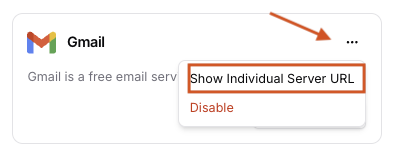 Complete Auth by Click "Anthorize" button.
Add to your favorite MCP-supported clients, such as Cursor, Claude Code, VS Code, ChatGPT, etc.
```bash pip theme={null}
pip install klavis
```
```bash npm theme={null}
npm install klavis
```
```bash Curl theme={null}
curl -X POST "https://api.klavis.ai/mcp-server/instance/create" \
-H "Authorization: Bearer YOUR_KLAVIS_API_KEY" \
-H "Content-Type: application/json" \
-d '{
"serverName": "Gmail",
"userId": "user123"
}'
```
```python Python theme={null}
from klavis import Klavis
from klavis.types import McpServerName
klavis_client = Klavis(api_key="YOUR_KLAVIS_API_KEY")
server = klavis_client.mcp_server.create_server_instance(
server_name=McpServerName.GMAIL,
user_id="user123",
)
print(server.server_url)
```
```javascript TypeScript theme={null}
import { KlavisClient, Klavis } from 'klavis';
const klavisClient = new KlavisClient({ apiKey: 'YOUR_KLAVIS_API_KEY' });
const server = await klavisClient.mcpServer.createServerInstance({
serverName: Klavis.McpServerName.Gmail,
userId: 'user123',
});
console.log(server.serverUrl);
```
**Response Information**: The API returns:
* `serverUrl`: The URL you'll use to connect your MCP client to the individual MCP Server
* `oauthUrl`: Authorization link if the service requires OAuth authentication
Full Individual MCP Server endpoints
```bash Curl theme={null}
Copy and paste the OAuth URL into your web browser
```
```python Python theme={null}
import webbrowser
if getattr(server, 'oauth_url', None):
webbrowser.open(server.oauth_url)
```
```javascript TypeScript theme={null}
if (server.oauthUrl) {
window?.open?.(server.oauthUrl);
}
```
**Authentication Methods**:
* **API Key**: See [API Key authentication guide](/docs/auth/api-key) for details.
* **OAuth**: See [OAuth authentication guide](/docs/auth/oauth) for details.
🎉 **Your MCP Server URL is ready to use!** Once authentication is complete, you can use your MCP server URL with any MCP-compatible client.
```python Python theme={null}
import os
import asyncio
import webbrowser
from klavis import Klavis
from klavis.types import McpServerName
from langchain_openai import ChatOpenAI
from langchain_mcp_adapters.client import MultiServerMCPClient
from langgraph.prebuilt import create_react_agent
from dotenv import load_dotenv
load_dotenv()
async def main() -> None:
klavis_client = Klavis(api_key=os.getenv("KLAVIS_API_KEY"))
# Step 1: Create a single MCP server (e.g., Gmail)
response = klavis_client.mcp_server.create_server_instance(
server_name=McpServerName.GMAIL,
user_id="demo_user",
)
# Step 2: Handle OAuth authorization if needed
if hasattr(response, 'oauth_url') and response.oauth_url:
webbrowser.open(response.oauth_url)
input("Press Enter after completing OAuth authorization...")
# Step 3: Create LangChain Agent with MCP Tools
mcp_client = MultiServerMCPClient({
"gmail": {
"transport": "streamable_http",
"url": response.server_url,
}
})
# Get all available tools from the server
tools = await mcp_client.get_tools()
# Setup LLM
llm = ChatOpenAI(model="gpt-4o-mini", api_key=os.getenv("OPENAI_API_KEY"))
# Step 4: Create LangChain agent with MCP tools
agent = create_react_agent(
model=llm,
tools=tools,
prompt=(
"You are a helpful assistant that can use MCP tools. "
),
)
# Step 5: Invoke the agent
result = await agent.ainvoke({
"messages": [{"role": "user", "content": "Search my inbox for unread emails and summarize."}],
})
# Print only the final AI response content
print(result["messages"][-1].content)
if __name__ == "__main__":
asyncio.run(main())
```
```python Python theme={null}
import os
import asyncio
import webbrowser
from klavis import Klavis
from klavis.types import McpServerName
from llama_index.llms.openai import OpenAI
from llama_index.core.agent.workflow import FunctionAgent
from llama_index.tools.mcp import BasicMCPClient
from llama_index.tools.mcp import (
aget_tools_from_mcp_url,
)
from dotenv import load_dotenv
load_dotenv()
async def main() -> None:
klavis_client = Klavis(api_key=os.getenv("KLAVIS_API_KEY"))
# Step 1: Create a single MCP server (e.g., Gmail)
response = klavis_client.mcp_server.create_server_instance(
server_name=McpServerName.GMAIL,
user_id="demo_user",
)
# Step 2: Handle OAuth authorization if needed
if hasattr(response, 'oauth_url') and response.oauth_url:
webbrowser.open(response.oauth_url)
input("Press Enter after completing OAuth authorization...")
# Step 3: Create LlamaIndex Agent with MCP Tools
tools = await aget_tools_from_mcp_url(
response.server_url,
client=BasicMCPClient(response.server_url)
)
# Setup LLM
llm = OpenAI(model="gpt-4o-mini", api_key=os.getenv("OPENAI_API_KEY"))
# Step 4: Create LlamaIndex agent with MCP tools
agent = FunctionAgent(
name="gmail_agent",
description="Agent using Gmail MCP tools",
tools=tools,
llm=llm,
system_prompt=(
"You are a helpful assistant that can use MCP tools. "
),
)
# Step 5: Invoke the agent
result = await agent.run(
"Search my inbox for unread emails and summarize."
)
# Print the response
print(result)
if _name_ == "_main_":
asyncio.run(main())
```
Coming soon
```python Python theme={null}
import os
import asyncio
import webbrowser
from dotenv import load_dotenv
from klavis import Klavis
from klavis.types import McpServerName
from autogen_agentchat.agents import AssistantAgent
from autogen_agentchat.ui import Console
from autogen_core import CancellationToken
from autogen_ext.models.openai import OpenAIChatCompletionClient
from autogen_ext.tools.mcp import StreamableHttpMcpToolAdapter, StreamableHttpServerParams
from autogen_ext.tools.mcp import mcp_server_tools
load_dotenv()
async def main() -> None:
klavis_client = Klavis(api_key=os.getenv("KLAVIS_API_KEY"))
# Create MCP server instance
response = klavis_client.mcp_server.create_server_instance(
server_name=McpServerName.GMAIL,
user_id="demo_user",
)
# Handle OAuth authorization if required
if getattr(response, "oauth_url", None):
webbrowser.open(response.oauth_url)
input("Press Enter after completing OAuth authorization...")
server_params = StreamableHttpServerParams(
url=response.server_url,
timeout=30.0,
sse_read_timeout=300.0,
terminate_on_close=True,
)
adapters = await mcp_server_tools(server_params)
model_client = OpenAIChatCompletionClient(model="gpt-4")
agent = AssistantAgent(
name="MailAI",
model_client=model_client,
tools=adapters,
system_message="You are a helpful Gmail assistant.",
)
await Console(
agent.run_stream(
task="Find My Latest Emails",
cancellation_token=CancellationToken()
)
)
if __name__ == "__main__":
asyncio.run(main())
```
Visit [https://github.com/Klavis-AI/klavis/mcp\_servers](https://github.com/Klavis-AI/klavis/mcp_servers) to view the source code and find more information
```bash Docker theme={null}
docker run -p 5000:5000 ghcr.io/klavis-ai/gmail-mcp-server:latest
```
Browse all available MCP server Docker images at [GitHub Packages](https://github.com/orgs/Klavis-AI/packages?repo_name=klavis)
Use the local URL (for example, [http://localhost:5000](http://localhost:5000)) in your client or aggregator.
Add TLS, auth, and deploy behind your gateway as needed.
For the recommended approach with better tool management and progressive discovery, see [Strata MCP Server](/docs/quickstart#strata).
Complete Auth by Click "Anthorize" button.
Add to your favorite MCP-supported clients, such as Cursor, Claude Code, VS Code, ChatGPT, etc.
```bash pip theme={null}
pip install klavis
```
```bash npm theme={null}
npm install klavis
```
```bash Curl theme={null}
curl -X POST "https://api.klavis.ai/mcp-server/instance/create" \
-H "Authorization: Bearer YOUR_KLAVIS_API_KEY" \
-H "Content-Type: application/json" \
-d '{
"serverName": "Gmail",
"userId": "user123"
}'
```
```python Python theme={null}
from klavis import Klavis
from klavis.types import McpServerName
klavis_client = Klavis(api_key="YOUR_KLAVIS_API_KEY")
server = klavis_client.mcp_server.create_server_instance(
server_name=McpServerName.GMAIL,
user_id="user123",
)
print(server.server_url)
```
```javascript TypeScript theme={null}
import { KlavisClient, Klavis } from 'klavis';
const klavisClient = new KlavisClient({ apiKey: 'YOUR_KLAVIS_API_KEY' });
const server = await klavisClient.mcpServer.createServerInstance({
serverName: Klavis.McpServerName.Gmail,
userId: 'user123',
});
console.log(server.serverUrl);
```
**Response Information**: The API returns:
* `serverUrl`: The URL you'll use to connect your MCP client to the individual MCP Server
* `oauthUrl`: Authorization link if the service requires OAuth authentication
Full Individual MCP Server endpoints
```bash Curl theme={null}
Copy and paste the OAuth URL into your web browser
```
```python Python theme={null}
import webbrowser
if getattr(server, 'oauth_url', None):
webbrowser.open(server.oauth_url)
```
```javascript TypeScript theme={null}
if (server.oauthUrl) {
window?.open?.(server.oauthUrl);
}
```
**Authentication Methods**:
* **API Key**: See [API Key authentication guide](/docs/auth/api-key) for details.
* **OAuth**: See [OAuth authentication guide](/docs/auth/oauth) for details.
🎉 **Your MCP Server URL is ready to use!** Once authentication is complete, you can use your MCP server URL with any MCP-compatible client.
```python Python theme={null}
import os
import asyncio
import webbrowser
from klavis import Klavis
from klavis.types import McpServerName
from langchain_openai import ChatOpenAI
from langchain_mcp_adapters.client import MultiServerMCPClient
from langgraph.prebuilt import create_react_agent
from dotenv import load_dotenv
load_dotenv()
async def main() -> None:
klavis_client = Klavis(api_key=os.getenv("KLAVIS_API_KEY"))
# Step 1: Create a single MCP server (e.g., Gmail)
response = klavis_client.mcp_server.create_server_instance(
server_name=McpServerName.GMAIL,
user_id="demo_user",
)
# Step 2: Handle OAuth authorization if needed
if hasattr(response, 'oauth_url') and response.oauth_url:
webbrowser.open(response.oauth_url)
input("Press Enter after completing OAuth authorization...")
# Step 3: Create LangChain Agent with MCP Tools
mcp_client = MultiServerMCPClient({
"gmail": {
"transport": "streamable_http",
"url": response.server_url,
}
})
# Get all available tools from the server
tools = await mcp_client.get_tools()
# Setup LLM
llm = ChatOpenAI(model="gpt-4o-mini", api_key=os.getenv("OPENAI_API_KEY"))
# Step 4: Create LangChain agent with MCP tools
agent = create_react_agent(
model=llm,
tools=tools,
prompt=(
"You are a helpful assistant that can use MCP tools. "
),
)
# Step 5: Invoke the agent
result = await agent.ainvoke({
"messages": [{"role": "user", "content": "Search my inbox for unread emails and summarize."}],
})
# Print only the final AI response content
print(result["messages"][-1].content)
if __name__ == "__main__":
asyncio.run(main())
```
```python Python theme={null}
import os
import asyncio
import webbrowser
from klavis import Klavis
from klavis.types import McpServerName
from llama_index.llms.openai import OpenAI
from llama_index.core.agent.workflow import FunctionAgent
from llama_index.tools.mcp import BasicMCPClient
from llama_index.tools.mcp import (
aget_tools_from_mcp_url,
)
from dotenv import load_dotenv
load_dotenv()
async def main() -> None:
klavis_client = Klavis(api_key=os.getenv("KLAVIS_API_KEY"))
# Step 1: Create a single MCP server (e.g., Gmail)
response = klavis_client.mcp_server.create_server_instance(
server_name=McpServerName.GMAIL,
user_id="demo_user",
)
# Step 2: Handle OAuth authorization if needed
if hasattr(response, 'oauth_url') and response.oauth_url:
webbrowser.open(response.oauth_url)
input("Press Enter after completing OAuth authorization...")
# Step 3: Create LlamaIndex Agent with MCP Tools
tools = await aget_tools_from_mcp_url(
response.server_url,
client=BasicMCPClient(response.server_url)
)
# Setup LLM
llm = OpenAI(model="gpt-4o-mini", api_key=os.getenv("OPENAI_API_KEY"))
# Step 4: Create LlamaIndex agent with MCP tools
agent = FunctionAgent(
name="gmail_agent",
description="Agent using Gmail MCP tools",
tools=tools,
llm=llm,
system_prompt=(
"You are a helpful assistant that can use MCP tools. "
),
)
# Step 5: Invoke the agent
result = await agent.run(
"Search my inbox for unread emails and summarize."
)
# Print the response
print(result)
if _name_ == "_main_":
asyncio.run(main())
```
Coming soon
```python Python theme={null}
import os
import asyncio
import webbrowser
from dotenv import load_dotenv
from klavis import Klavis
from klavis.types import McpServerName
from autogen_agentchat.agents import AssistantAgent
from autogen_agentchat.ui import Console
from autogen_core import CancellationToken
from autogen_ext.models.openai import OpenAIChatCompletionClient
from autogen_ext.tools.mcp import StreamableHttpMcpToolAdapter, StreamableHttpServerParams
from autogen_ext.tools.mcp import mcp_server_tools
load_dotenv()
async def main() -> None:
klavis_client = Klavis(api_key=os.getenv("KLAVIS_API_KEY"))
# Create MCP server instance
response = klavis_client.mcp_server.create_server_instance(
server_name=McpServerName.GMAIL,
user_id="demo_user",
)
# Handle OAuth authorization if required
if getattr(response, "oauth_url", None):
webbrowser.open(response.oauth_url)
input("Press Enter after completing OAuth authorization...")
server_params = StreamableHttpServerParams(
url=response.server_url,
timeout=30.0,
sse_read_timeout=300.0,
terminate_on_close=True,
)
adapters = await mcp_server_tools(server_params)
model_client = OpenAIChatCompletionClient(model="gpt-4")
agent = AssistantAgent(
name="MailAI",
model_client=model_client,
tools=adapters,
system_message="You are a helpful Gmail assistant.",
)
await Console(
agent.run_stream(
task="Find My Latest Emails",
cancellation_token=CancellationToken()
)
)
if __name__ == "__main__":
asyncio.run(main())
```
Visit [https://github.com/Klavis-AI/klavis/mcp\_servers](https://github.com/Klavis-AI/klavis/mcp_servers) to view the source code and find more information
```bash Docker theme={null}
docker run -p 5000:5000 ghcr.io/klavis-ai/gmail-mcp-server:latest
```
Browse all available MCP server Docker images at [GitHub Packages](https://github.com/orgs/Klavis-AI/packages?repo_name=klavis)
Use the local URL (for example, [http://localhost:5000](http://localhost:5000)) in your client or aggregator.
Add TLS, auth, and deploy behind your gateway as needed.
For the recommended approach with better tool management and progressive discovery, see [Strata MCP Server](/docs/quickstart#strata).