> ## Documentation Index
> Fetch the complete documentation index at: https://www.klavis.ai/docs/llms.txt
> Use this file to discover all available pages before exploring further.
# Quickstart
> Let your agent connect any tools reliably in minutes via MCP
## Strata
One MCP server that lets AI agents handle any tools progressively.
Go to your Dashboard.
Klavis enables all integrations for you by default. Click the ellipsis button if you want to disable a specific integration.
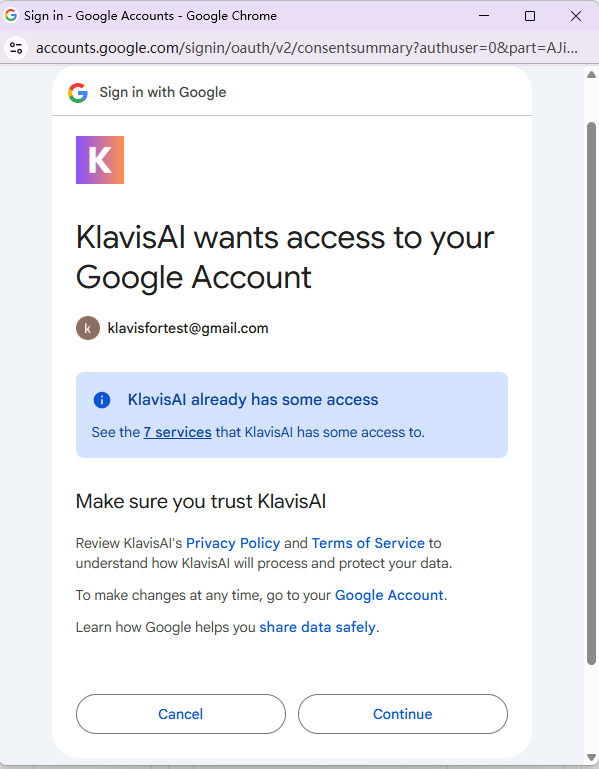
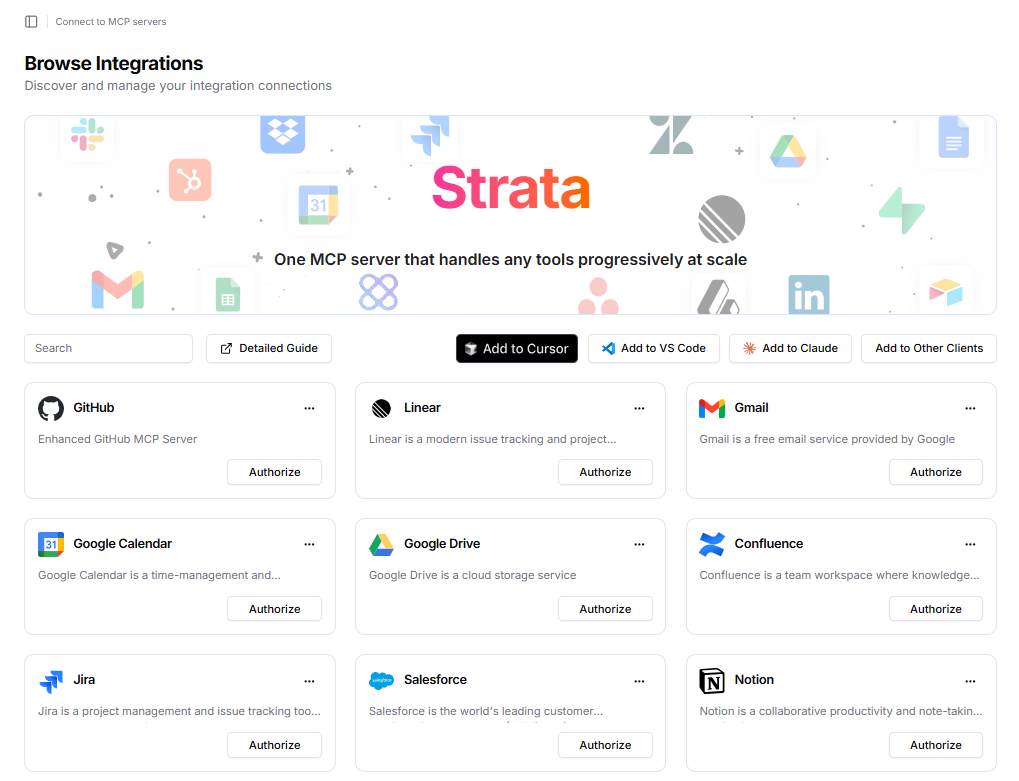 Complete authentication by clicking the **"Authorize"** button. Most of the applications has OAuth support. Just follow the OAuth flow to authorize them.
Some applications might need you to provide API keys or other kinds of secrets to authorize.
Some applications don't have **"Authorize"** buttons. It means they don't require authentication and you can access them directly.
We also provide an authentication handler tool in MCP that will prompt to authenticate when if you didn't authorize them.
Complete authentication by clicking the **"Authorize"** button. Most of the applications has OAuth support. Just follow the OAuth flow to authorize them.
Some applications might need you to provide API keys or other kinds of secrets to authorize.
Some applications don't have **"Authorize"** buttons. It means they don't require authentication and you can access them directly.
We also provide an authentication handler tool in MCP that will prompt to authenticate when if you didn't authorize them.
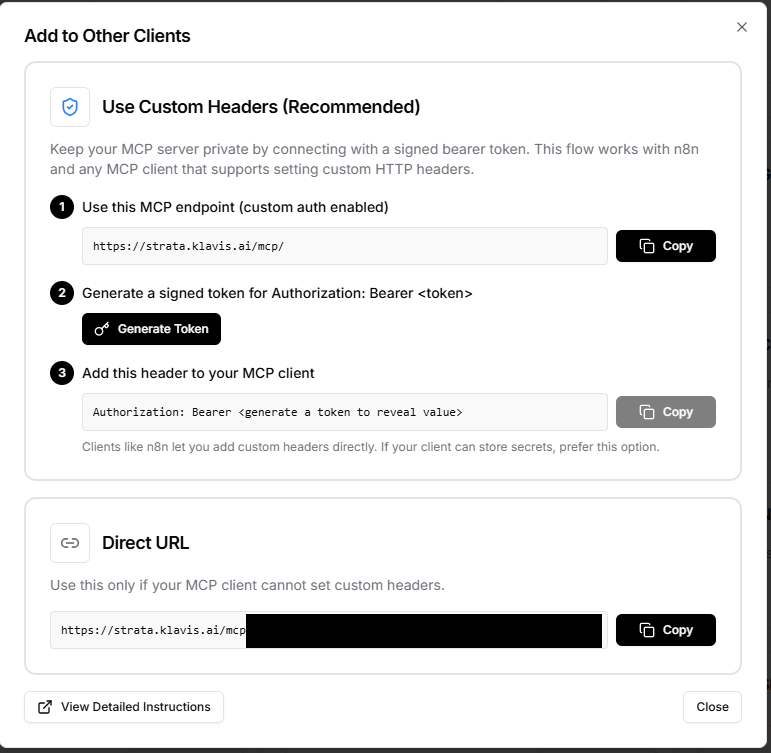
 Add to your favorite MCP-supported clients, such as Cursor, Claude Code, VS Code, ChatGPT, etc.
To get the MCP server URL and access token, click the **"Add to Other Clients"** button on the top right corner of the dashboard.
Both the URL with access token and the direct URL provide you with the **same** MCP. But it's recommended to use the URL with access token as it's a more secure way to connect.
DO NOT share your access token or direct URL publicly as they provide access to your connected accounts and data.
Add to your favorite MCP-supported clients, such as Cursor, Claude Code, VS Code, ChatGPT, etc.
To get the MCP server URL and access token, click the **"Add to Other Clients"** button on the top right corner of the dashboard.
Both the URL with access token and the direct URL provide you with the **same** MCP. But it's recommended to use the URL with access token as it's a more secure way to connect.
DO NOT share your access token or direct URL publicly as they provide access to your connected accounts and data.
 **Prerequisites** Before you begin, [create an account](https://www.klavis.ai/home/api-keys) and get the API Key.
```bash pip theme={null}
pip install klavis
```
```bash npm theme={null}
npm install klavis
```
`userId` specifies whose connected accounts and data you are accessing in Klavis. It should be a unique id for yourself, your team, or your organization.
```bash Curl theme={null}
curl -X POST "https://api.klavis.ai/mcp-server/strata/create" \
-H "Authorization: Bearer YOUR_KLAVIS_API_KEY" \
-H "Content-Type: application/json" \
-d '{
"userId": "user123",
"servers": ["Gmail", "YouTube"]
}'
```
```python Python theme={null}
from klavis import Klavis
from klavis.types import McpServerName
klavis_client = Klavis(api_key="YOUR_KLAVIS_API_KEY")
response = klavis_client.mcp_server.create_strata_server(
user_id="user123",
servers=[McpServerName.GMAIL, McpServerName.YOUTUBE],
)
```
```typescript TypeScript theme={null}
import { Klavis } from 'klavis';
const klavis = new Klavis.Client({ apiKey: 'YOUR_KLAVIS_API_KEY' });
const strata = await klavis.strata.create({
userId: 'user123',
servers: ['GMAIL', 'YOUTUBE'],
});
```
**Response Information**: The API returns:
* `strataServerUrl`: The URL you'll use to connect your MCP client to the Strata MCP Server
* `oauthUrls`: Authorization links for services that require OAuth authentication
* `apiKeyUrls`: Links to configure API keys for services that use API key authentication
Full Strata API endpoints
```bash Curl theme={null}
Copy and paste the OAuth URL into your web browser
```
```python Python theme={null}
import webbrowser
# Handle OAuth authorization if needed
if response.oauth_urls:
for server_name, oauth_url in response.oauth_urls.items():
webbrowser.open(oauth_url)
input(f"Press Enter after completing {server_name} OAuth authorization...")
```
```typescript TypeScript theme={null}
// Handle OAuth authorization if needed
if (response.oauthUrls) {
for (const [serverName, oauthUrl] of Object.entries(response.oauthUrls)) {
if (typeof window !== 'undefined') {
window.open(oauthUrl);
}
console.log(`Please complete ${serverName} OAuth authorization at: ${oauthUrl}`);
// In a real application, you'd wait for OAuth completion via callback
await new Promise(resolve => {
console.log(`Press any key after completing ${serverName} OAuth authorization...`);
// This would be replaced with proper OAuth flow handling
resolve(null);
});
}
}
```
**Authentication Methods**:
* **API Key**: See [API Key authentication guide](/docs/auth/api-key) for details.
* **OAuth**: See [OAuth authentication guide](/docs/auth/oauth) for details.
🎉 **Your MCP Server URL is ready to use!** Once authentication is complete, you can use your MCP server URL with any MCP-compatible client.
```python Python theme={null}
import os
import asyncio
import webbrowser
from klavis import Klavis
from klavis.types import McpServerName
from langchain_openai import ChatOpenAI
from langchain_mcp_adapters.client import MultiServerMCPClient
from langgraph.prebuilt import create_react_agent
from dotenv import load_dotenv
load_dotenv()
async def main():
klavis_client = Klavis(api_key=os.getenv("KLAVIS_API_KEY"))
# Step 1: Create a Strata MCP server with Gmail and YouTube integrations
response = klavis_client.mcp_server.create_strata_server(
user_id="demo_user",
servers=[McpServerName.GMAIL, McpServerName.YOUTUBE],
)
# Step 2: Handle OAuth authorization if needed
if response.oauth_urls:
for server_name, oauth_url in response.oauth_urls.items():
webbrowser.open(oauth_url)
input(f"Press Enter after completing {server_name} OAuth authorization...")
# Step 3: Create LangChain Agent with MCP Tools
mcp_client = MultiServerMCPClient({
"strata": {
"transport": "streamable_http",
"url": response.strata_server_url,
}
})
# Get all available tools from Strata
tools = await mcp_client.get_tools()
# Setup LLM
llm = ChatOpenAI(model="gpt-4o-mini", api_key=os.getenv("OPENAI_API_KEY"))
# Step 4: Create LangChain agent with MCP tools
agent = create_react_agent(
model=llm,
tools=tools,
prompt=(
"You are a helpful assistant that can use MCP tools. "
),
)
my_email = "golden-kpop@example.com" # TODO: Replace with your email
# Step 5: Invoke the agent
result = await agent.ainvoke({
"messages": [{"role": "user", "content": f"summarize this video - https://youtu.be/yebNIHKAC4A?si=1Rz_ZsiVRz0YfOR7 and send the summary to my email {my_email}"}],
})
# Print only the final AI response content
print(result["messages"][-1].content)
if __name__ == "__main__":
asyncio.run(main())
```
```python Python theme={null}
import os
import asyncio
import webbrowser
from klavis import Klavis
from klavis.types import McpServerName
from llama_index.llms.openai import OpenAI
from llama_index.core.agent.workflow import FunctionAgent
from llama_index.tools.mcp import BasicMCPClient
from llama_index.tools.mcp import (
aget_tools_from_mcp_url,
)
from dotenv import load_dotenv
load_dotenv()
async def main():
klavis_client = Klavis(api_key=os.getenv("KLAVIS_API_KEY"))
# Step 1: Create a Strata MCP server with Gmail and YouTube integrations
response = klavis_client.mcp_server.create_strata_server(
user_id="1234",
servers=[McpServerName.GMAIL, McpServerName.YOUTUBE],
)
# Step 2: Handle OAuth authorization if needed
if response.oauth_urls:
for server_name, oauth_url in response.oauth_urls.items():
webbrowser.open(oauth_url)
input(f"Press Enter after completing {server_name} OAuth authorization...")
# Get all available tools from Strata
tools = await aget_tools_from_mcp_url(
response.strata_server_url,
client=BasicMCPClient(response.strata_server_url)
)
# Setup LLM
llm = OpenAI(model="gpt-4o-mini", api_key=os.getenv("OPENAI_API_KEY"))
# Step 3: Create LlamaIndex agent with MCP tools
agent = FunctionAgent(
name="my_first_agent",
description="Agent using MCP-based tools",
tools=tools,
llm=llm,
system_prompt="You are an AI assistant that uses MCP tools.",
)
my_email = "golden-kpop@example.com" # TODO: Replace with your email
youtube_video_url = "https://youtu.be/yebNIHKAC4A?si=1Rz_ZsiVRz0YfOR7" # TODO: Replace with your favorite youtube video URL
# Step 4: Invoke the agent
response = await agent.run(
f"summarize this video - {youtube_video_url} and mail this summary to my email {my_email}"
)
print(response)
if __name__ == "__main__":
asyncio.run(main())
```
Coming soon
```python Python theme={null}
import os
import asyncio
import webbrowser
from dotenv import load_dotenv
from klavis import Klavis
from klavis.types import McpServerName
from autogen_agentchat.agents import AssistantAgent
from autogen_agentchat.ui import Console
from autogen_core import CancellationToken
from autogen_ext.models.openai import OpenAIChatCompletionClient
from autogen_ext.tools.mcp import StreamableHttpServerParams
from autogen_ext.tools.mcp import mcp_server_tools
load_dotenv()
async def main() -> None:
klavis_client = Klavis(api_key=os.getenv("KLAVIS_API_KEY"))
# Step 1: Create a Strata MCP server with Gmail and YouTube integrations
response = klavis_client.mcp_server.create_strata_server(
user_id="demo_user",
servers=[McpServerName.GMAIL, McpServerName.YOUTUBE],
)
# Handle OAuth authorization if required
if response.oauth_urls:
for server_name, oauth_url in response.oauth_urls.items():
webbrowser.open(oauth_url)
input(f"Press Enter after completing {server_name} OAuth authorization...")
server_params = StreamableHttpServerParams(
url=response.strata_server_url,
timeout=30.0,
sse_read_timeout=300.0,
terminate_on_close=True,
)
adapters = await mcp_server_tools(server_params)
model_client = OpenAIChatCompletionClient(model="gpt-4")
agent = AssistantAgent(
name="MultiAI",
model_client=model_client,
tools=adapters,
system_message="You are a helpful AI assistant.",
)
await Console(
agent.run_stream(
task="Get my latest mails.",
cancellation_token=CancellationToken(),
)
)
if __name__ == "__main__":
asyncio.run(main())
```
Visit [https://github.com/Klavis-AI/klavis](https://github.com/Klavis-AI/klavis) to view the source code and find more information
```bash pipx theme={null}
pipx install strata-mcp
```
```bash pip theme={null}
pip install strata-mcp
```
Configure your MCP servers using the CLI tool.
```bash Add Server theme={null}
strata add
```
```bash List Servers theme={null}
strata list
```
```bash Enable Server theme={null}
strata enable
```
Start the Strata server to manage all your tools.
```bash Stdio Mode (Default) theme={null}
strata
```
```bash HTTP/SSE Mode theme={null}
strata run --port 8080
```
Use the Strata tool to add your AI client.
```bash Claude Code theme={null}
strata tool add claude
```
```bash Cursor theme={null}
strata tool add cursor
```
```bash VSCode theme={null}
strata tool add vscode
```
If you're interested in 1:1 mapping between API and tool using our MCP Server Instance, [check here](/docs/legacy/instance).
## Next steps
Integrate Klavis MCP Servers with leading AI platforms
Explore available MCP servers
Progressive tool discovery across apps
REST endpoints and schemas
**Prerequisites** Before you begin, [create an account](https://www.klavis.ai/home/api-keys) and get the API Key.
```bash pip theme={null}
pip install klavis
```
```bash npm theme={null}
npm install klavis
```
`userId` specifies whose connected accounts and data you are accessing in Klavis. It should be a unique id for yourself, your team, or your organization.
```bash Curl theme={null}
curl -X POST "https://api.klavis.ai/mcp-server/strata/create" \
-H "Authorization: Bearer YOUR_KLAVIS_API_KEY" \
-H "Content-Type: application/json" \
-d '{
"userId": "user123",
"servers": ["Gmail", "YouTube"]
}'
```
```python Python theme={null}
from klavis import Klavis
from klavis.types import McpServerName
klavis_client = Klavis(api_key="YOUR_KLAVIS_API_KEY")
response = klavis_client.mcp_server.create_strata_server(
user_id="user123",
servers=[McpServerName.GMAIL, McpServerName.YOUTUBE],
)
```
```typescript TypeScript theme={null}
import { Klavis } from 'klavis';
const klavis = new Klavis.Client({ apiKey: 'YOUR_KLAVIS_API_KEY' });
const strata = await klavis.strata.create({
userId: 'user123',
servers: ['GMAIL', 'YOUTUBE'],
});
```
**Response Information**: The API returns:
* `strataServerUrl`: The URL you'll use to connect your MCP client to the Strata MCP Server
* `oauthUrls`: Authorization links for services that require OAuth authentication
* `apiKeyUrls`: Links to configure API keys for services that use API key authentication
Full Strata API endpoints
```bash Curl theme={null}
Copy and paste the OAuth URL into your web browser
```
```python Python theme={null}
import webbrowser
# Handle OAuth authorization if needed
if response.oauth_urls:
for server_name, oauth_url in response.oauth_urls.items():
webbrowser.open(oauth_url)
input(f"Press Enter after completing {server_name} OAuth authorization...")
```
```typescript TypeScript theme={null}
// Handle OAuth authorization if needed
if (response.oauthUrls) {
for (const [serverName, oauthUrl] of Object.entries(response.oauthUrls)) {
if (typeof window !== 'undefined') {
window.open(oauthUrl);
}
console.log(`Please complete ${serverName} OAuth authorization at: ${oauthUrl}`);
// In a real application, you'd wait for OAuth completion via callback
await new Promise(resolve => {
console.log(`Press any key after completing ${serverName} OAuth authorization...`);
// This would be replaced with proper OAuth flow handling
resolve(null);
});
}
}
```
**Authentication Methods**:
* **API Key**: See [API Key authentication guide](/docs/auth/api-key) for details.
* **OAuth**: See [OAuth authentication guide](/docs/auth/oauth) for details.
🎉 **Your MCP Server URL is ready to use!** Once authentication is complete, you can use your MCP server URL with any MCP-compatible client.
```python Python theme={null}
import os
import asyncio
import webbrowser
from klavis import Klavis
from klavis.types import McpServerName
from langchain_openai import ChatOpenAI
from langchain_mcp_adapters.client import MultiServerMCPClient
from langgraph.prebuilt import create_react_agent
from dotenv import load_dotenv
load_dotenv()
async def main():
klavis_client = Klavis(api_key=os.getenv("KLAVIS_API_KEY"))
# Step 1: Create a Strata MCP server with Gmail and YouTube integrations
response = klavis_client.mcp_server.create_strata_server(
user_id="demo_user",
servers=[McpServerName.GMAIL, McpServerName.YOUTUBE],
)
# Step 2: Handle OAuth authorization if needed
if response.oauth_urls:
for server_name, oauth_url in response.oauth_urls.items():
webbrowser.open(oauth_url)
input(f"Press Enter after completing {server_name} OAuth authorization...")
# Step 3: Create LangChain Agent with MCP Tools
mcp_client = MultiServerMCPClient({
"strata": {
"transport": "streamable_http",
"url": response.strata_server_url,
}
})
# Get all available tools from Strata
tools = await mcp_client.get_tools()
# Setup LLM
llm = ChatOpenAI(model="gpt-4o-mini", api_key=os.getenv("OPENAI_API_KEY"))
# Step 4: Create LangChain agent with MCP tools
agent = create_react_agent(
model=llm,
tools=tools,
prompt=(
"You are a helpful assistant that can use MCP tools. "
),
)
my_email = "golden-kpop@example.com" # TODO: Replace with your email
# Step 5: Invoke the agent
result = await agent.ainvoke({
"messages": [{"role": "user", "content": f"summarize this video - https://youtu.be/yebNIHKAC4A?si=1Rz_ZsiVRz0YfOR7 and send the summary to my email {my_email}"}],
})
# Print only the final AI response content
print(result["messages"][-1].content)
if __name__ == "__main__":
asyncio.run(main())
```
```python Python theme={null}
import os
import asyncio
import webbrowser
from klavis import Klavis
from klavis.types import McpServerName
from llama_index.llms.openai import OpenAI
from llama_index.core.agent.workflow import FunctionAgent
from llama_index.tools.mcp import BasicMCPClient
from llama_index.tools.mcp import (
aget_tools_from_mcp_url,
)
from dotenv import load_dotenv
load_dotenv()
async def main():
klavis_client = Klavis(api_key=os.getenv("KLAVIS_API_KEY"))
# Step 1: Create a Strata MCP server with Gmail and YouTube integrations
response = klavis_client.mcp_server.create_strata_server(
user_id="1234",
servers=[McpServerName.GMAIL, McpServerName.YOUTUBE],
)
# Step 2: Handle OAuth authorization if needed
if response.oauth_urls:
for server_name, oauth_url in response.oauth_urls.items():
webbrowser.open(oauth_url)
input(f"Press Enter after completing {server_name} OAuth authorization...")
# Get all available tools from Strata
tools = await aget_tools_from_mcp_url(
response.strata_server_url,
client=BasicMCPClient(response.strata_server_url)
)
# Setup LLM
llm = OpenAI(model="gpt-4o-mini", api_key=os.getenv("OPENAI_API_KEY"))
# Step 3: Create LlamaIndex agent with MCP tools
agent = FunctionAgent(
name="my_first_agent",
description="Agent using MCP-based tools",
tools=tools,
llm=llm,
system_prompt="You are an AI assistant that uses MCP tools.",
)
my_email = "golden-kpop@example.com" # TODO: Replace with your email
youtube_video_url = "https://youtu.be/yebNIHKAC4A?si=1Rz_ZsiVRz0YfOR7" # TODO: Replace with your favorite youtube video URL
# Step 4: Invoke the agent
response = await agent.run(
f"summarize this video - {youtube_video_url} and mail this summary to my email {my_email}"
)
print(response)
if __name__ == "__main__":
asyncio.run(main())
```
Coming soon
```python Python theme={null}
import os
import asyncio
import webbrowser
from dotenv import load_dotenv
from klavis import Klavis
from klavis.types import McpServerName
from autogen_agentchat.agents import AssistantAgent
from autogen_agentchat.ui import Console
from autogen_core import CancellationToken
from autogen_ext.models.openai import OpenAIChatCompletionClient
from autogen_ext.tools.mcp import StreamableHttpServerParams
from autogen_ext.tools.mcp import mcp_server_tools
load_dotenv()
async def main() -> None:
klavis_client = Klavis(api_key=os.getenv("KLAVIS_API_KEY"))
# Step 1: Create a Strata MCP server with Gmail and YouTube integrations
response = klavis_client.mcp_server.create_strata_server(
user_id="demo_user",
servers=[McpServerName.GMAIL, McpServerName.YOUTUBE],
)
# Handle OAuth authorization if required
if response.oauth_urls:
for server_name, oauth_url in response.oauth_urls.items():
webbrowser.open(oauth_url)
input(f"Press Enter after completing {server_name} OAuth authorization...")
server_params = StreamableHttpServerParams(
url=response.strata_server_url,
timeout=30.0,
sse_read_timeout=300.0,
terminate_on_close=True,
)
adapters = await mcp_server_tools(server_params)
model_client = OpenAIChatCompletionClient(model="gpt-4")
agent = AssistantAgent(
name="MultiAI",
model_client=model_client,
tools=adapters,
system_message="You are a helpful AI assistant.",
)
await Console(
agent.run_stream(
task="Get my latest mails.",
cancellation_token=CancellationToken(),
)
)
if __name__ == "__main__":
asyncio.run(main())
```
Visit [https://github.com/Klavis-AI/klavis](https://github.com/Klavis-AI/klavis) to view the source code and find more information
```bash pipx theme={null}
pipx install strata-mcp
```
```bash pip theme={null}
pip install strata-mcp
```
Configure your MCP servers using the CLI tool.
```bash Add Server theme={null}
strata add
```
```bash List Servers theme={null}
strata list
```
```bash Enable Server theme={null}
strata enable
```
Start the Strata server to manage all your tools.
```bash Stdio Mode (Default) theme={null}
strata
```
```bash HTTP/SSE Mode theme={null}
strata run --port 8080
```
Use the Strata tool to add your AI client.
```bash Claude Code theme={null}
strata tool add claude
```
```bash Cursor theme={null}
strata tool add cursor
```
```bash VSCode theme={null}
strata tool add vscode
```
If you're interested in 1:1 mapping between API and tool using our MCP Server Instance, [check here](/docs/legacy/instance).
## Next steps
Integrate Klavis MCP Servers with leading AI platforms
Explore available MCP servers
Progressive tool discovery across apps
REST endpoints and schemas