The Executive Snapshot
For support engineering teams and technical product managers, the "knowledge gap" between ticket intake (Zendesk, Intercom, Email) and execution (ClickUp, Jira) is the primary bottleneck in resolving customer issues.
By connecting ClickUp to Large Language Models (LLMs) using the Model Context Protocol (MCP), developers can move beyond simple "text generation" to create agents capable of reading live project states, updating task statuses, and correlating support tickets with engineering backlogs in real-time. This guide explores the architectural benefits of this integration, specifically using Klavis Strata to manage authentication and tool orchestration, and provides verifiable prompt examples to test these capabilities immediately.
The Cost of Context: Why Support Teams Need Direct LLM Access to Project Data
In a traditional support workflow, the "swivel-chair" effect is the enemy of throughput. Support agents act as manual routers, constantly switching between communication platforms and project management tools to verify if a bug has been fixed, if a feature has been deployed, or who is assigned to a critical incident.
This manual context switching is not just annoying; it is measurably expensive. According to a study by Harvard Business Review, the average knowledge worker toggles between apps and windows more than 1,200 times per day, costing roughly 9% of their total annual work time. For a support team of 10, that is the equivalent of losing one full-time employee solely to tab-switching.
Furthermore, the disconnect leads to "data staleness." A support agent might tell a customer a fix is "in progress" because they are looking at a cached view or an old Slack message, while the ClickUp task was actually moved to "QA Failed" two hours ago.
The MCP Advantage: Dynamic vs. Static Context
Integrating LLMs via Model Context Protocol (MCP) changes the topology of this workflow. Instead of an agent manually searching ClickUp, the LLM acts as an intelligent layer that has "read/write" access to the database.
Comparison: Manual Workflow vs. MCP-Enabled Agent
| Metric | Manual Human Lookup | Traditional API Scripting | MCP-Enabled LLM Agent |
|---|---|---|---|
| Information Latency | High (5-15 mins search time) | Low (<1 sec) | Low (<2 sec) |
| Context Awareness | Limited by human memory | Rigid (hard-coded logic) | Adaptive (understands nuance) |
| Maintenance Cost | N/A | High (brittle endpoints) | Low (standardized protocol) |
| Actionability | Read/Write (Slow) | Read/Write (Fast, high error risk) | Reasoning + Execution |
By using MCP, you provide the LLM with a live cursor into your ClickUp workspace. This allows the model to answer complex questions like "Is the API latency fix scheduled for this week's sprint?" by querying the live data, rather than hallucinating an answer or refusing to answer due to lack of knowledge.
Orchestrating the Connection: The Role of Klavis Strata
While the Model Context Protocol provides the standard for how an LLM talks to a tool, managing the infrastructure for those connections remains a significant hurdle. Building a custom MCP server for ClickUp involves handling OAuth handshakes, token refreshing, permission scoping, and hosting the server infrastructure.
This is where Klavis AI fits into the stack. Rather than building a monolithic agent, developers utilize Strata, Klavis’s unified MCP server.
Solving the "Model Context Overload" Problem
A major hurdle in building robust AI agents is Model Context Overload. When developers connect an LLM to enterprise platforms like ClickUp, the natural instinct is to expose every possible API endpoint (creating tasks, updating lists, managing folders, time tracking, etc.) to the model at once.
However, when an LLM is presented with hundreds of tool definitions simultaneously, its attention mechanism degrades. This "context saturation" leads to increased hallucinations, higher token costs, and a significant drop in the model's ability to select the correct tool for the job.
Klavis Strata solves this through Progressive Discovery. Instead of dumping a massive static schema of every available tool into the context window, Strata acts as a dynamic gateway that exposes tool definitions just-in-time. It follows a human-like reasoning structure:
- Intent: The model analyzes the user's request (e.g., "Update the bug report") to determine high-level intent.
- Discover: Strata dynamically reveals only the relevant subset of tools (e.g., exposing
clickup.taskstools while keepingclickup.time_trackingorjira.issueshidden). - Execute: The model selects and executes the specific function against the now-visible API.
By keeping the context window clean and focused, Strata ensures that agents remain accurate and responsive, even when they technically have access to thousands of underlying API capabilities.
Integration Guide
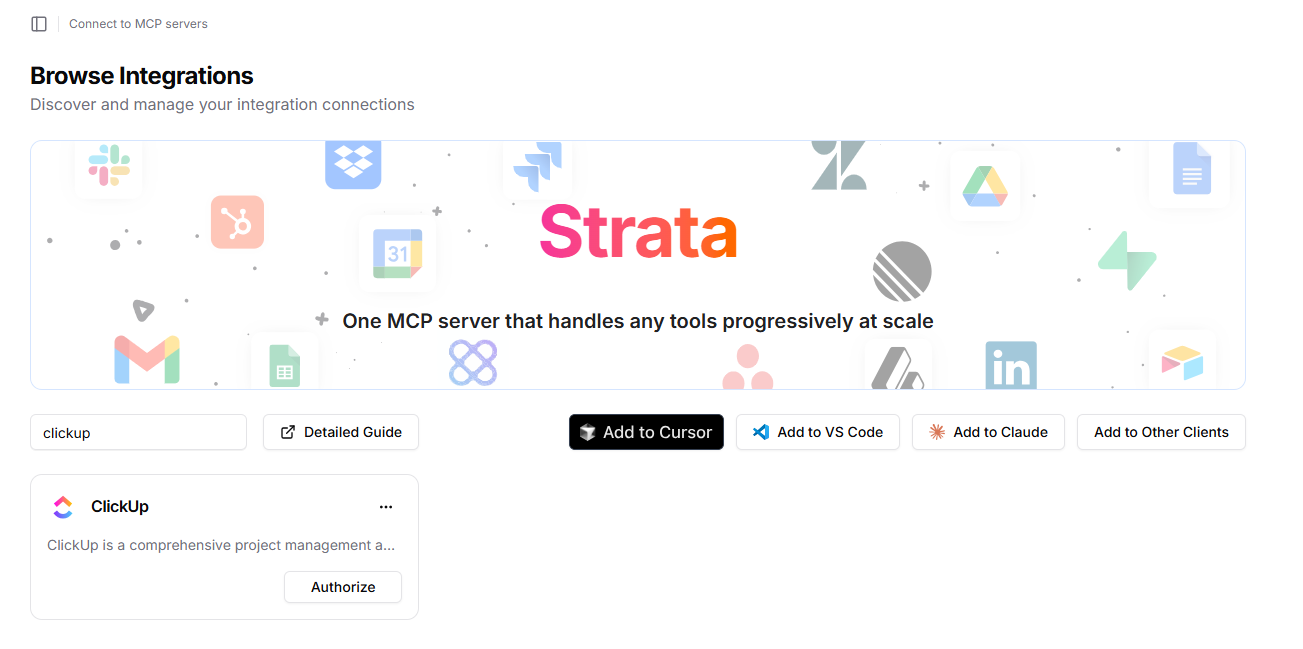
- Sign up for a Klavis AI account, and navigate to your account home.
- Use the search box to find the ClickUp integration, the click Authorize.
- Follow the OAuth flow to connect your ClickUp workspace to Klavis Strata MCP.
- Connect strata MCP to your preferred LLM provider (OpenAI, Anthropic, etc.).
- Once connected, you can start building prompts that leverage ClickUp's API via MCP.
3 Practical Support Engineering Use Cases (With Prompts)
The theoretical value of MCP is clear, but the practical application is where ROI is realized. Below are three streamlined use cases for a ClickUp-LLM integration via Klavis Strata, designed to simplify complex workflows into natural language commands.
Use Case 1: Automated Daily Progress Reporting (ClickUp + Slack)
Managers and leads often spend the last 30 minutes of their day copy-pasting status updates into chat apps. By connecting both ClickUp and a communication tool (like Slack or Discord) via MCP, an LLM can autonomously generate and distribute these reports.
Test Prompt:
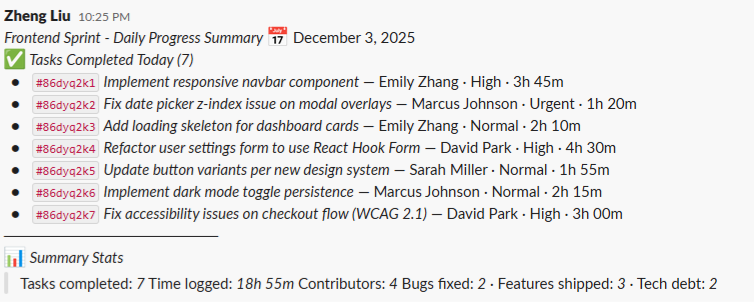
"Find all tasks in the 'Frontend Sprint' list that were marked as 'Done' today. Summarize them into a brief bulleted list and post the summary to the #daily-standup Slack channel."
Result: The LLM successfully retrieves the tasks, formats them, and posts the message to Slack.
Use Case 2: Rapid Task Creation and Modification
Sometimes the ClickUp UI is too slow for "stream of consciousness" planning. Navigating menus to set due dates, assignees, and priorities takes multiple clicks. Using natural language via MCP turns a multi-step UI process into a single sentence.
Test Prompt:
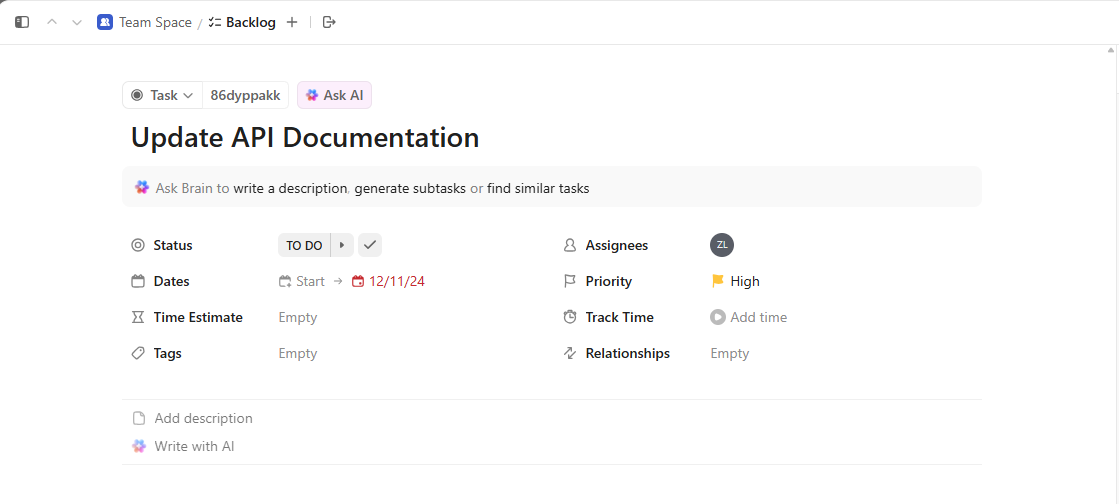
"Create a task named 'Update API Documentation' in the 'Backlog' list. Immediately assign it to me, set the priority to High, and set the due date to next Friday."
Result: The LLM parses your intent into sequential API calls—first creating the task to generate an ID, then updating it with the correct assignee and due date.
Use Case 3: Cross-Platform Synchronization (Jira to ClickUp)
A common friction point in support is the "tool gap": Engineering lives in Jira, but Support lives in ClickUp. When a critical bug arises, manual mirroring between tools often leads to copy-paste errors or missing details. An MCP-enabled agent can bridge this gap instantly.
Test Prompt:
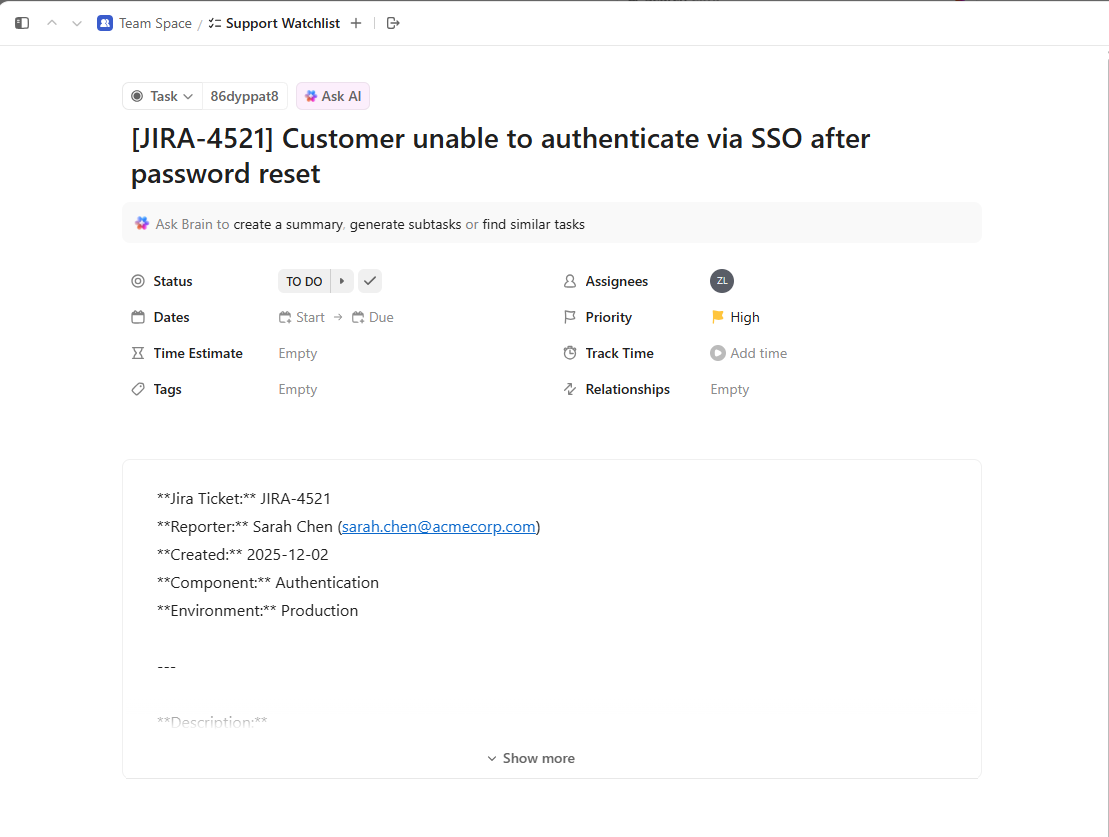
"Read the description and priority of Jira issue 4521. Create a new task in my ClickUp 'Support Watchlist' with the same title and content so I can track it."
Result: The agent retrieves the full technical context from Jira (Description, Priority, Status) and maps it perfectly to a new ClickUp task, ensuring the support team sees exactly what the engineers see.
Conclusion
The integration of ClickUp with LLMs via the Model Context Protocol represents a shift from "managed projects" to "intelligent operations." By removing the friction of manual data retrieval, teams can reduce their Time-to-Resolution (TTR) and ensure that customer communication is always backed by the ground truth of engineering data.
While building these connections manually requires significant overhead, platforms like Klavis AI simplify the infrastructure, allowing developers to focus on defining the logic and prompts that drive value, rather than maintaining OAuth tokens.
For developers looking to standardize their AI infrastructure, the Model Context Protocol specification offers the blueprint, while tools like Strata provide the engine to run it at scale.
Frequently Asked Questions
Q: Does using MCP with ClickUp expose all my data to the LLM provider? No. MCP is designed with security in mind. The LLM only receives the data that is explicitly retrieved by the tool execution. If the agent queries a specific task, only that task's data enters the context window. Furthermore, Klavis AI is SOC 2 compliant and follows best practices for data privacy.
Q: Can the LLM accidentally delete tasks in ClickUp? This depends on the permissions granted to the MCP server. Best practice dictates using a "System User" for the API connection with restricted permissions (e.g., can_comment and can_edit_status, but not delete_task). MCP tools can also be configured as "read-only" for specific agent deployments.
Q: Is the response time slow when querying ClickUp? Latency is primarily driven by the ClickUp API response time and the LLM's token generation speed. In most production cases, a full query-and-response cycle takes between 3 to 8 seconds. This is significantly faster than the average human navigation time required to switch tabs, search, and read a ticket.